I've noticed that there are still alot of people that don't know how to post pictures so I'm going to do a bit of a tutorial here. I think there are FAQs and tidbits on it here and there but no real guide. I don't want to be here all day so I'm going to us the XP platform as my main focus because it should cover the majority of the users here.
Part 1: Getting your photos off the camera!
The nice thing about Windows XP is that is makes this process pretty easy without having to use the proprietary software included with your digital cameras.
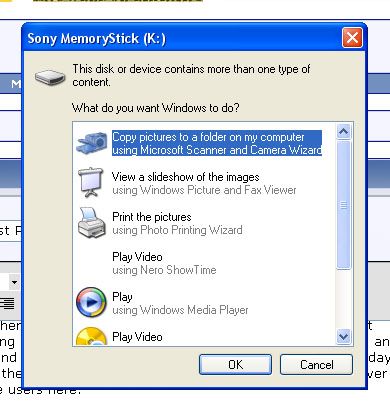
This is quite possibly the most annoying dialogue ever but it's useful for getting photos off a camera.
Click "Copy pictures to a folder on my computer....."
Click "NEXT" on the following screen
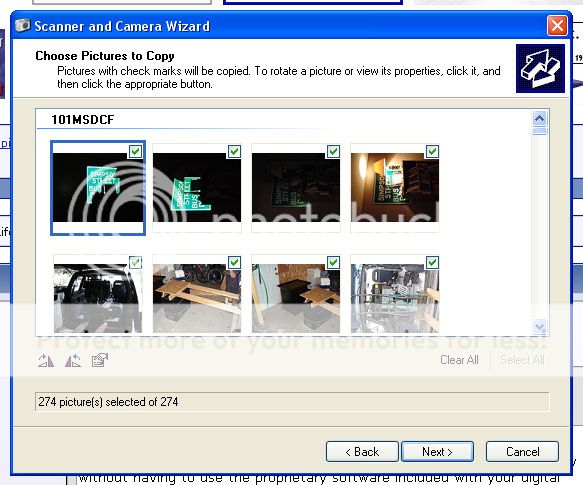
you will then see this screen:
Here you can select or unselect (Via the checkmarks) the pictures that you want to copy to your computer. You can also rotate them so that they don't come off the camera sideways (You know, when you've been artistic and taken pictures with the camera tilted 90deg)!
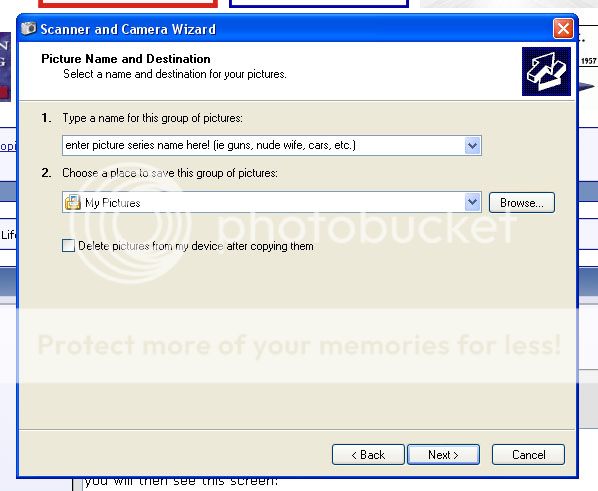
Once all your pictures are selected, hit "NEXT" and you'll see this:
In the top box enter the name of the picture series (All the pics that come off the camera will have a number after them (001, 002, 003 etc)
the bottom box is the folder they will be downloaded to. The default it "My Pictures" which is located inside "My Documents" (Most of you will have a link to "my documents" on your desktop)
Click "NEXT"... when you do, you'll see a little box showing the progress of your photos being copied to your computer. There ya go... you're pictures are now on your computer.
Part 2: Resizing your pictures so their useful
I found a neat little program called "Photo Resize Magic". It's Freeware, it's small and it's easy to use. You can get it here:
http://www.RealFileTools.com/free/photorm.zip
It looks like this:
This unit here will resize EVERYTHING in your source folder! So if you have a bunch of pictures in your "My Pictures" folder, it will resize ALL of them! (Pretty easy eh?)
So click on the 3 dots button (" ... ") to the right of "Source folder" (Bottom half of the window) and the "Browse for Folder" window will pop up. Click on "My Doccuments" and then click on "My Pictures". You'll probably want to use a different folder for resized pictures. So this time click the 3-dots button to the right of "Target Folder". The same "Browse for Folder" window will pop up. Again go to "my Documents" then "My Pictures" but this time, after clicking "My pictures" click
"Make New Folder" you can then type in a name for the folder like "Resized pictures" or something else you will remember. hit enter to complete the rename and then click on your new folder. Now press the OK button.
Under the "Settings" area I would set the quality to "Very good" using the drop down menu and then set the size to 1024x768
Now click "START"

It will process all of your pictures and throw them into the "Resize" directory. There ya go. All your pictures are now resized on your computer
Part 3: Getting them onto the net
Alrighty, to get your photo's on the net you need a host. I'm going to use Photobucket as an example because that's the site I use (If anyone else knows of a better site, let me know).
Login to your photobucket account. If you don't have one you'll need to click the "Join now" link and make an account.
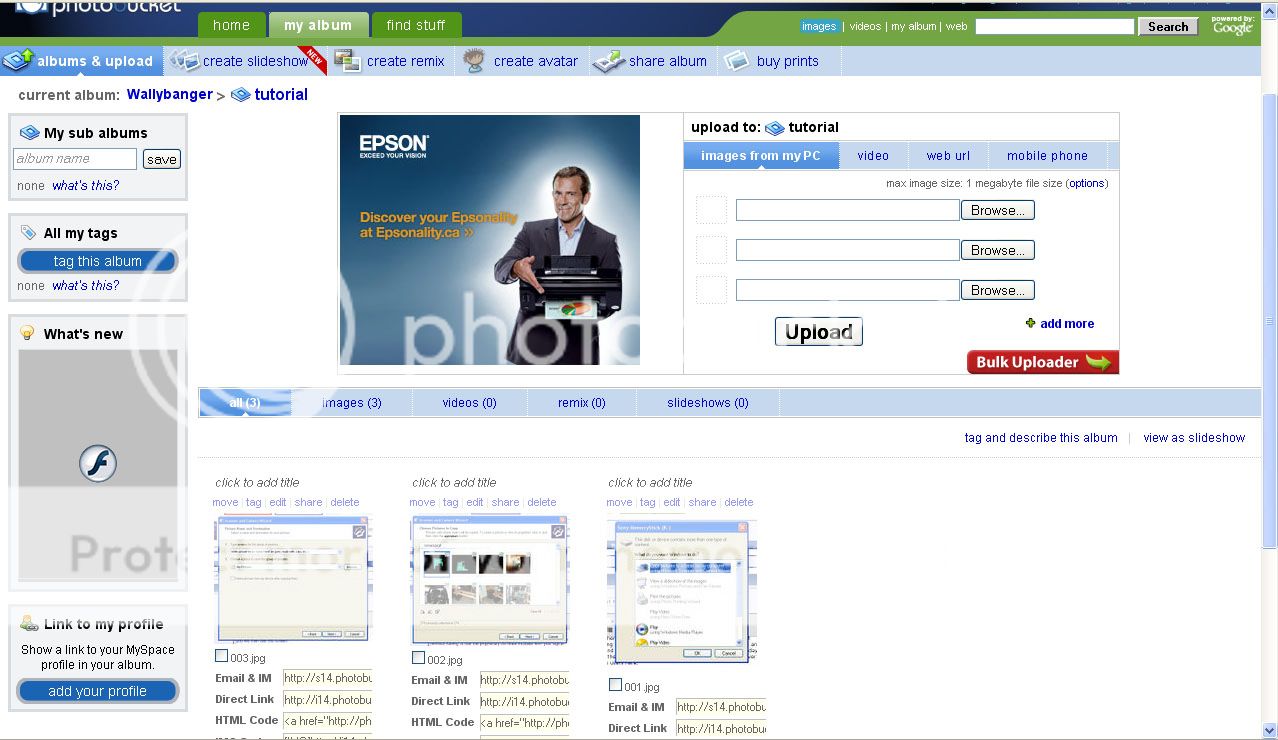
When you log in you'll get a page that looks like this:
Simply click on the browse buttons, (It will bring up another one of those "Browse for folder" type windows) go to your my documents\my pictures\resized folder and select your pictures one at a time.
When you have browsed to all your pictures, click the "UPLOAD" button. All of your pictures will the be uploaded onto photobucket and, when completed, they will all appear down below as you can see in the picture above.
Next you need the code for the picture to post it here on CGN.
[IMG]http://i14.photobucket.com/albums/a318/Wallybanger/tutorial/005.jpg
When you click in that yellowish area the text will be highlighted. Right click on it and hit copy.
[IMG]http://i14.photobucket.com/albums/a318/Wallybanger/tutorial/006.jpg
Now when you come back into the CGN window you can right click and hit "Paste". what it will paste is a line of text that looks like this:
[IM G]http://i14.photobucket.com/albums/a318/Wallybanger/tutorial/006.jpg[/IMG]
That's It!
Now when you submit your post there will be a photo in it!
If I've missed anything or if you have any problems
that can't be solved with google drop me a PM and I'll help ya out.
Cheers,
Wally