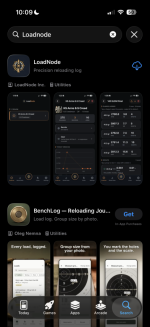
Update, i have direct link for Apple App Store that works but im not sure if its against the rules here to post it, when i search in App Store i can't find it, probably still being indexed by Apple. Meanwhile i have a direct link posted on my website. Dont want to break any rules since i don't know if i can post a website link here in comment or the direct link either.












































You are using an out of date browser. It may not display this or other websites correctly.
You should upgrade or use an alternative browser.
You should upgrade or use an alternative browser.
Got fed up with the notebook and a pile of spreadsheets, so I wrote my own reloading log
- Thread starter spectrality
- Start date

It'll show up on Apple soon enough.Update, i have direct link for Apple App Store that works but im not sure if its against the rules here to post it, when i search in App Store i can't find it, probably still being indexed by Apple. Meanwhile i have a direct link posted on my website. Dont want to break any rules since i don't know if i can post a website link here in comment or the direct link either.
AFAIK you are OK as long as you don't post a hotlink - leave a space somewhere like htt ps://blah.blah.blah.com
People (including myself) that find non-sponsor items post them that way and I've not heard of admins coming down on them.
Yeah I've seen those but don't want to twist my luck. Also worth mentioning, it looks like Apple release the app but didn't approve the upgrade options, I'm working with them as we speak to push the next version out, hope they work through the approval faster than before but you never know. I will update when all issues with them are resolved. In the new version, i also added an option to work on tuning your load with a Barrel Tuner as well as other quality of life improvements based on the feedback of other people already using the app. So stay tuned, much more coming, and as always any feedback is very appreciated together with feature requests or quality of life improvements.It'll show up on Apple soon enough.
AFAIK you are OK as long as you don't post a hotlink - leave a space somewhere like htt ps://blah.blah.blah.com
People (including myself) that find non-sponsor items post them that way and I've not heard of admins coming down on them.
LoadNode update: the App Store problems are sorted, and two things you asked for are in
A few of you hit problems with the iPhone version, and some of you couldn't find the app at all. Both are fixed, so here is the state of things.
Buying Pro on iPhone works now. It did not before, and I want to be straight about that rather than quietly fixing it. The in-app purchases had never been approved, so anyone who tapped the button on iPhone got an error and nothing else. All three are approved as of this week and version 1.0.189 is live on both stores. If you tried to buy Pro on an iPhone and it failed, it will work now. Nothing was charged when it failed.
Searching "LoadNode" finds it. For a while you had to type "Load Node" with a space, which is not something anyone would guess. That has resolved itself now that the listing has been reindexed. One word, no space, works on both stores.
What is new in 1.0.189
Both of the real features came from requests on this forum, so credit where it is due.
Density altitude you can type in. If you carry a Kestrel, it measures temperature, humidity and station pressure where you are standing and gives you density altitude directly. Making you re-enter three fields so the app could recalculate a number you were already holding was pointless friction, and its answer was not better than yours: yours was measured at the firing point.
So you can now type the figure straight in. It shows as "3,500 ft (entered)" so you can always tell a measurement from a calculation, it survives you correcting the temperature afterwards, and clearing the field goes back to calculating. That last part mattered more than the field itself. A version that let you type a number and then silently replaced it with an estimate the next time you touched another field would have been worse than not having it.
Tuner ladders. Someone here posted the sheet he keeps at the bench: charge held still, seating held still, only the tuner position stepping, with a group and a velocity string against each. That is a ladder like any other, so a tuner test is now its own session type alongside charge weight, seating depth and neck tension, rather than a field bolted onto something else.
It is free. Same machinery as the charge ladder, which is free, and putting a request behind the paywall the same week it was asked for is not a trade I want to make.
Plus two fixes to entering conditions that were quietly getting things wrong.
One thing to flag
If you bought Pro and it is not showing on your account, message me. There is a narrow case involving signing out and then buying that can leave a purchase attached to the wrong place. I found it on my own account this week, the fix is written and in the next update, and I can sort out anyone affected in the meantime. Your purchase is not lost, it is just pointing at the wrong thing.
As always, if something is wrong or missing, say so here. Both features above exist because someone did.
A few of you hit problems with the iPhone version, and some of you couldn't find the app at all. Both are fixed, so here is the state of things.
Buying Pro on iPhone works now. It did not before, and I want to be straight about that rather than quietly fixing it. The in-app purchases had never been approved, so anyone who tapped the button on iPhone got an error and nothing else. All three are approved as of this week and version 1.0.189 is live on both stores. If you tried to buy Pro on an iPhone and it failed, it will work now. Nothing was charged when it failed.
Searching "LoadNode" finds it. For a while you had to type "Load Node" with a space, which is not something anyone would guess. That has resolved itself now that the listing has been reindexed. One word, no space, works on both stores.
What is new in 1.0.189
Both of the real features came from requests on this forum, so credit where it is due.
Density altitude you can type in. If you carry a Kestrel, it measures temperature, humidity and station pressure where you are standing and gives you density altitude directly. Making you re-enter three fields so the app could recalculate a number you were already holding was pointless friction, and its answer was not better than yours: yours was measured at the firing point.
So you can now type the figure straight in. It shows as "3,500 ft (entered)" so you can always tell a measurement from a calculation, it survives you correcting the temperature afterwards, and clearing the field goes back to calculating. That last part mattered more than the field itself. A version that let you type a number and then silently replaced it with an estimate the next time you touched another field would have been worse than not having it.
Tuner ladders. Someone here posted the sheet he keeps at the bench: charge held still, seating held still, only the tuner position stepping, with a group and a velocity string against each. That is a ladder like any other, so a tuner test is now its own session type alongside charge weight, seating depth and neck tension, rather than a field bolted onto something else.
It is free. Same machinery as the charge ladder, which is free, and putting a request behind the paywall the same week it was asked for is not a trade I want to make.
Plus two fixes to entering conditions that were quietly getting things wrong.
One thing to flag
If you bought Pro and it is not showing on your account, message me. There is a narrow case involving signing out and then buying that can leave a purchase attached to the wrong place. I found it on my own account this week, the fix is written and in the next update, and I can sort out anyone affected in the meantime. Your purchase is not lost, it is just pointing at the wrong thing.
As always, if something is wrong or missing, say so here. Both features above exist because someone did.


- Location
- Calgary, AB
Very nice app. Thanks
Very nice app. Thanks
Thanks, that means a lot. The whole point is to build something people genuinely enjoy using at the bench and at the range, not just another app that gets in the way. If anything ever feels awkward, is missing, or could work better, I'd love to hear it. Every piece of feedback gets read, and a lot of what's in the app came straight from users.
Not a request, only a question.
I got confused for a bit printing out couple of these tuning/challenge sheets.
I know for sure I selected a dot size of let say 0.5 MOA (or vsr), and when I look at the circled says 0.25 MOA. Yes, on a print the larger or smaller dot/circle/cross size is recognisable, but I made a mistake and read the numbers in the corner.
It toke me some time to read actually what is saying there "1 square is 0.25 MOA"
But you already showing it at the second place as well "0.25 MOA per square"
View attachment 1205734
View attachment 1205735
Would that be possible to figure out somehow to show somewhere, per say replace one of your notes with a size for a dot/circle/cross as well?
I believe you put this one in a wrong thread since i think i know which target generator you are using but I'm not the one who made it


leveractionjunkie
CGN frequent flyer
- Location
- Kamloops, BC
Downloaded yesterday and have so far just entered a couple of rifles. Have not logged any recipes or used the load development or target analysis yet.
I will likely upgrade to use the “cost analysis” feature as I think that’s awesome.
So far very limited use but I quite like it and wish I would’ve been keeping a lot of this data for yrs now.
Also really like that I somewhat know the source of the apps design and creation. Hope it all works out well. Thanks
I will likely upgrade to use the “cost analysis” feature as I think that’s awesome.
So far very limited use but I quite like it and wish I would’ve been keeping a lot of this data for yrs now.
Also really like that I somewhat know the source of the apps design and creation. Hope it all works out well. Thanks
OMG you rightI believe you put this one in a wrong thread since i think i know which target generator you are using but I'm not the one who made it
Sheisss I'm so embarased now. Edited.
Last edited:
Yes, looks like Apple is taking its sweet time making it available worldwide, in usa its up already but not in Canada yet. I will update as soon as i see it in my Apple App store on my iphone. thanks
It is available in Canada, please search for loadnode it will show up
OMG you right
Sheisss I'm so embarased now. Edited.
No worries at all
Hi all,
Quick update from the LoadNode side. A new build has just gone to Apple and Google for review, and it should reach your phones as soon as they approve it, usually within a few days.
A big part of it came straight from this thread, so thank you. Here is what is in it:
**More cartridges, and your own.**
The catalogue has gone from 91 cartridges to 192. 6 PPC is in, 6BR is easier to find, and so are 6 BRX, the rest of the PPC family, 30 BR and 7 BR. Bullets went from 149 to 198, so the calibres that used to open an empty bullet list now have projectiles in them. If your chambering still is not there, you can now add it to the rifle yourself with its bullet diameter, and the bullet list filters to it properly.
**Swap barrels in a different chambering.**
If you run a 6 PPC barrel on a .308 action, that barrel now gets its own bullets, brass and primers, its own hole size on the target, and its own name everywhere, instead of borrowing the rifle's.
**Groups from your electronic target.**
If you already have the group size off an electronic target, you can type it straight in. It is recorded as entered, the angular size is worked out from your range, and it sits alongside your photo-measured groups.
**Compare sessions.**
You can put charges from different jobs side by side, and it tells you when the conditions differed enough that the comparison needs a pinch of salt.
**Your data, your way.**
Export everything to CSV (Pro), with a short guide to how the files join up. You can also set a factory ammo price for any cartridge, including a wildcat you typed in, and the cost comparison uses it.
**Your units, everywhere.**
If you run metric, every velocity, group size, range and chart now follows your settings, including the PDF reports and the home-screen widget.
**Purchases.**
Restore Purchases now lives in Settings where you can always find it, and a purchase made on your phone before you signed in carries over when you do.
**AI analysis.**
A saved analysis now tells you if the group or its shots have changed since it was written, so you know when to run it again.
And, as always, a good number of bugs were squished along the way.
If something is missing for your setup, or you hit anything odd once the update lands, post here or send me a message. Most of this build started as a comment in a thread like this one.
Thanks again for the feedback, and for the patience.
Quick update from the LoadNode side. A new build has just gone to Apple and Google for review, and it should reach your phones as soon as they approve it, usually within a few days.
A big part of it came straight from this thread, so thank you. Here is what is in it:
**More cartridges, and your own.**
The catalogue has gone from 91 cartridges to 192. 6 PPC is in, 6BR is easier to find, and so are 6 BRX, the rest of the PPC family, 30 BR and 7 BR. Bullets went from 149 to 198, so the calibres that used to open an empty bullet list now have projectiles in them. If your chambering still is not there, you can now add it to the rifle yourself with its bullet diameter, and the bullet list filters to it properly.
**Swap barrels in a different chambering.**
If you run a 6 PPC barrel on a .308 action, that barrel now gets its own bullets, brass and primers, its own hole size on the target, and its own name everywhere, instead of borrowing the rifle's.
**Groups from your electronic target.**
If you already have the group size off an electronic target, you can type it straight in. It is recorded as entered, the angular size is worked out from your range, and it sits alongside your photo-measured groups.
**Compare sessions.**
You can put charges from different jobs side by side, and it tells you when the conditions differed enough that the comparison needs a pinch of salt.
**Your data, your way.**
Export everything to CSV (Pro), with a short guide to how the files join up. You can also set a factory ammo price for any cartridge, including a wildcat you typed in, and the cost comparison uses it.
**Your units, everywhere.**
If you run metric, every velocity, group size, range and chart now follows your settings, including the PDF reports and the home-screen widget.
**Purchases.**
Restore Purchases now lives in Settings where you can always find it, and a purchase made on your phone before you signed in carries over when you do.
**AI analysis.**
A saved analysis now tells you if the group or its shots have changed since it was written, so you know when to run it again.
And, as always, a good number of bugs were squished along the way.
If something is missing for your setup, or you hit anything odd once the update lands, post here or send me a message. Most of this build started as a comment in a thread like this one.
Thanks again for the feedback, and for the patience.
Hi all,
LoadNode 1.1 is live on both the App Store and Google Play. Nearly all of it
came from this thread and from two shooters who sent long, specific notes after
a range day, so thank you. If you already have it, update from your store;
everything you have logged comes with you.
Here is what is in it, in the order you are most likely to notice it.
You can edit a session after you have created it.
This was the most common
complaint and it was a fair one. A session's name, goal and notes were written
once by the wizard and then frozen, so a typo in a name was permanent, and a
jam measurement taken after you started the job had nowhere to go at all. All
of it is editable now, and a jam entered late still feeds the throat erosion
chart. It is dated as measured when the reading was taken, not when you got
round to typing it, so a March reading corrected in September does not slide
to the wrong end of the chart.
The jam, the jump and the loaded CBTO are now one fact written three ways
They used to be three independent boxes, which meant you could correct a jam
and be left with a jump and a CBTO that no longer agreed with it, with nothing
on screen to say so. Type either one and the other fills in. Correct the jam
and the app moves the side you did not type, not the side you did. Delete the
jam and the derived side goes with it rather than leaving a number nobody
entered.
The rounds the chronograph missed.
From a shooter three powders into a
7 PRC workup: "I fired ten and it caught seven. The brass is fired, the barrel
has ten more rounds on it and I am three bullets down, but the app only knows
about seven."
He was right, and it was not cosmetic. Every number the app worked out from
rounds fired was short: component stock, barrel life, cost, your season
totals. There is now a box on the shot log that asks how many rounds you
actually fired at that rung, and that number reaches all of them, plus the
printed session report, the Load Book and the firearm dossier.
It reaches no velocity statistic. A round the chronograph did not see has no
velocity, so it never touches an average, an SD, an ES or a group size, and the
app does not guess at one.
It asks for the total you fired rather than the number that went unrecorded,
which matters more than it sounds. Fire ten, chronograph seven, then mark all
ten holes on your target, and a box labelled "rounds the chronograph missed"
gets a perfectly honest "3" and charges you for thirteen. The rule takes the
largest of the three accounts it has, your chronograph record, the impacts on
the target and your own number, so the same round cannot be counted twice
whichever way you log it.
Compare loads side by side
You could compare rungs within a session, and
sessions against each other, but plenty of you are deciding between whole
recipes, a powder each. Each load now becomes one sample built from every group
ever measured on it, across every session, with the same confidence intervals
and the same pairwise test the charge comparison uses.
Two things it deliberately does not do. It does not mark a winner. And it says
so above the numbers rather than in a footnote that two loads differ by
whatever you changed between them and by every afternoon they were shot on:
barrel condition, weather, component lots and your own day all moved as well.
Read it as a place to look. This is a Pro feature, alongside the other charts.
Primer seating depth as a ladder
If you step primer seating in thou below flush, it is now a test type of its own, and it charts SD and group size
against depth the way a charge ladder does. Flush is zero and is a real setting
you can log. It is Pro, on the same footing as neck tension.
Every ladder now gets its charts in the report, not just charge ladders
If you ran a seating, tuner, neck-tension or primer-seating test and exported the
PDF, you got a report with no charts in it at all, because the report could
only plot against charge. Those four now chart against whatever the session
actually stepped, and the headings and captions name it rather than calling
everything a charge. Two of those test types are Pro, so it was the paid
deliverable that was missing its chart, which is the wrong way round.
The AI analysis knows what a non-charge ladder is
Same test types, same root cause: a seating or tuner rung was sent for analysis with no charge and
nothing saying what the ladder varied, so it was being asked to read a rung it
could not identify while your credit was spent. It now receives what the
session stepped and where that rung sat on it. As before, it comments on
technique and conditions only and never on what to load.
Copy a recipe, free
There was a Pro "Duplicate and tweak" that made a
linked version, and nothing for "just give me another one of these to start
from". A copy is free, has no parent, inherits none of the results it did not
earn, and gets a name unique on that rifle so two copies do not become
indistinguishable in a picker.
Notes, in the three places you asked for them
Rifles, loads and equipment all take notes now. The hint under each box tells you exactly where that note
will turn up: a load's note prints on the load card, in the session report, in
the Load Book and in the dossier, and follows the load into a duplicate. "Nowhere
to note which dies I used" came up twice in two days, so that one is a load note.
A status on each load that actually does something
Development, Active, Archived or Retired.
Archived and Retired both mean you are finished with a
load, and that now means one thing everywhere: left out of the "rounds you can
load" figure in Inventory with the exclusion stated, badged in the list, marked
in the Load Book and the dossier, and still offered in the session pickers,
because a session shot last season may well be on a load you have since
retired.
Sessions get the same treatment. Archiving one puts it away: out of the session
picker and out of the load comparison, with the screen telling you how many it
left out. Complete is deliberately not "put away", because a finished ladder is
the most useful thing to compare a new one against.
Every load in one place
The Firearms tab now has a second face listing every recipe you own across every rifle, with a count on each side. Each row
tells you which rifle it belongs to before the name means anything.
Money is handled properly now
If you keep prices in more than one currency,
the app used to relabel historical amounts with whatever your settings said
today, and add euros to dollars without a word. Nothing in this app converts
between currencies, and now every figure on the cost screens, the job cost card
and both PDFs is judged on the set of records it is actually made of. A price
with no currency on it prints bare and marked rather than borrowing a symbol,
and a per-load cost missing a component price is badged as partial and names
what is missing instead of printing at half price.
Two more on the same subject, both found late and both worth naming. A load
with every component priced but no charge weight on it was being costed as
though the powder were free, and because it counted as fully priced, every
warning that would have told you so was suppressed and the number printed as
if it were solid. And if you had entered component prices and a factory price
but no equipment yet, the dashboard told you your gear had paid for itself,
about gear you had not entered. Both are fixed, and a figure that cannot be
trusted now says so instead of looking confident.
Fixes worth naming
- Android 12 and below could not add a target photo from the library. You got a
permission prompt, allowing it did nothing, and the app then sent you to a
Settings switch that did not exist. That was a genuine permission loop, and it
is fixed. Android 13 and up were never affected. This one already went out to
Android on its own.
- Delete a barrel and keep its history, and on a switch-barrel rifle the app
started printing the action's cartridge in seven places, including on the
target card that leaves your phone. Each of those now says what it can
honestly know, and tells the difference between a barrel that was removed and
one that is on another rifle.
- A sync that reported success while the device was quietly missing rows. The
app now measures what it actually absorbed instead of trusting its own
bookmark, and repairs the gap.
- A correction typed into a measured group could be silently reverted before you
saved it, if the app happened to refresh underneath you, and the old
measurement was written back with nothing on screen to say so.
- Humidity is now checked as a percentage, so a slip cannot produce a density
altitude no place on earth could give you.
Keep the reports coming, they are what this release is made of and thank you all.
LoadNode 1.1 is live on both the App Store and Google Play. Nearly all of it
came from this thread and from two shooters who sent long, specific notes after
a range day, so thank you. If you already have it, update from your store;
everything you have logged comes with you.
Here is what is in it, in the order you are most likely to notice it.
You can edit a session after you have created it.
This was the most common
complaint and it was a fair one. A session's name, goal and notes were written
once by the wizard and then frozen, so a typo in a name was permanent, and a
jam measurement taken after you started the job had nowhere to go at all. All
of it is editable now, and a jam entered late still feeds the throat erosion
chart. It is dated as measured when the reading was taken, not when you got
round to typing it, so a March reading corrected in September does not slide
to the wrong end of the chart.
The jam, the jump and the loaded CBTO are now one fact written three ways
They used to be three independent boxes, which meant you could correct a jam
and be left with a jump and a CBTO that no longer agreed with it, with nothing
on screen to say so. Type either one and the other fills in. Correct the jam
and the app moves the side you did not type, not the side you did. Delete the
jam and the derived side goes with it rather than leaving a number nobody
entered.
The rounds the chronograph missed.
From a shooter three powders into a
7 PRC workup: "I fired ten and it caught seven. The brass is fired, the barrel
has ten more rounds on it and I am three bullets down, but the app only knows
about seven."
He was right, and it was not cosmetic. Every number the app worked out from
rounds fired was short: component stock, barrel life, cost, your season
totals. There is now a box on the shot log that asks how many rounds you
actually fired at that rung, and that number reaches all of them, plus the
printed session report, the Load Book and the firearm dossier.
It reaches no velocity statistic. A round the chronograph did not see has no
velocity, so it never touches an average, an SD, an ES or a group size, and the
app does not guess at one.
It asks for the total you fired rather than the number that went unrecorded,
which matters more than it sounds. Fire ten, chronograph seven, then mark all
ten holes on your target, and a box labelled "rounds the chronograph missed"
gets a perfectly honest "3" and charges you for thirteen. The rule takes the
largest of the three accounts it has, your chronograph record, the impacts on
the target and your own number, so the same round cannot be counted twice
whichever way you log it.
Compare loads side by side
You could compare rungs within a session, and
sessions against each other, but plenty of you are deciding between whole
recipes, a powder each. Each load now becomes one sample built from every group
ever measured on it, across every session, with the same confidence intervals
and the same pairwise test the charge comparison uses.
Two things it deliberately does not do. It does not mark a winner. And it says
so above the numbers rather than in a footnote that two loads differ by
whatever you changed between them and by every afternoon they were shot on:
barrel condition, weather, component lots and your own day all moved as well.
Read it as a place to look. This is a Pro feature, alongside the other charts.
Primer seating depth as a ladder
If you step primer seating in thou below flush, it is now a test type of its own, and it charts SD and group size
against depth the way a charge ladder does. Flush is zero and is a real setting
you can log. It is Pro, on the same footing as neck tension.
Every ladder now gets its charts in the report, not just charge ladders
If you ran a seating, tuner, neck-tension or primer-seating test and exported the
PDF, you got a report with no charts in it at all, because the report could
only plot against charge. Those four now chart against whatever the session
actually stepped, and the headings and captions name it rather than calling
everything a charge. Two of those test types are Pro, so it was the paid
deliverable that was missing its chart, which is the wrong way round.
The AI analysis knows what a non-charge ladder is
Same test types, same root cause: a seating or tuner rung was sent for analysis with no charge and
nothing saying what the ladder varied, so it was being asked to read a rung it
could not identify while your credit was spent. It now receives what the
session stepped and where that rung sat on it. As before, it comments on
technique and conditions only and never on what to load.
Copy a recipe, free
There was a Pro "Duplicate and tweak" that made a
linked version, and nothing for "just give me another one of these to start
from". A copy is free, has no parent, inherits none of the results it did not
earn, and gets a name unique on that rifle so two copies do not become
indistinguishable in a picker.
Notes, in the three places you asked for them
Rifles, loads and equipment all take notes now. The hint under each box tells you exactly where that note
will turn up: a load's note prints on the load card, in the session report, in
the Load Book and in the dossier, and follows the load into a duplicate. "Nowhere
to note which dies I used" came up twice in two days, so that one is a load note.
A status on each load that actually does something
Development, Active, Archived or Retired.
Archived and Retired both mean you are finished with a
load, and that now means one thing everywhere: left out of the "rounds you can
load" figure in Inventory with the exclusion stated, badged in the list, marked
in the Load Book and the dossier, and still offered in the session pickers,
because a session shot last season may well be on a load you have since
retired.
Sessions get the same treatment. Archiving one puts it away: out of the session
picker and out of the load comparison, with the screen telling you how many it
left out. Complete is deliberately not "put away", because a finished ladder is
the most useful thing to compare a new one against.
Every load in one place
The Firearms tab now has a second face listing every recipe you own across every rifle, with a count on each side. Each row
tells you which rifle it belongs to before the name means anything.
Money is handled properly now
If you keep prices in more than one currency,
the app used to relabel historical amounts with whatever your settings said
today, and add euros to dollars without a word. Nothing in this app converts
between currencies, and now every figure on the cost screens, the job cost card
and both PDFs is judged on the set of records it is actually made of. A price
with no currency on it prints bare and marked rather than borrowing a symbol,
and a per-load cost missing a component price is badged as partial and names
what is missing instead of printing at half price.
Two more on the same subject, both found late and both worth naming. A load
with every component priced but no charge weight on it was being costed as
though the powder were free, and because it counted as fully priced, every
warning that would have told you so was suppressed and the number printed as
if it were solid. And if you had entered component prices and a factory price
but no equipment yet, the dashboard told you your gear had paid for itself,
about gear you had not entered. Both are fixed, and a figure that cannot be
trusted now says so instead of looking confident.
Fixes worth naming
- Android 12 and below could not add a target photo from the library. You got a
permission prompt, allowing it did nothing, and the app then sent you to a
Settings switch that did not exist. That was a genuine permission loop, and it
is fixed. Android 13 and up were never affected. This one already went out to
Android on its own.
- Delete a barrel and keep its history, and on a switch-barrel rifle the app
started printing the action's cartridge in seven places, including on the
target card that leaves your phone. Each of those now says what it can
honestly know, and tells the difference between a barrel that was removed and
one that is on another rifle.
- A sync that reported success while the device was quietly missing rows. The
app now measures what it actually absorbed instead of trusting its own
bookmark, and repairs the gap.
- A correction typed into a measured group could be silently reverted before you
saved it, if the app happened to refresh underneath you, and the old
measurement was written back with nothing on screen to say so.
- Humidity is now checked as a percentage, so a slip cannot produce a density
altitude no place on earth could give you.
Keep the reports coming, they are what this release is made of and thank you all.
I apologize if it was already mentioned. but a tool that automatically analyzes groups based on a photo of the would be awesome.
The tool could use an internal open source LLM and you would simply select the caliber, distance, point of aim, inch/distance reference... then the model would automatically locate and mark the impacts then you would be able to assign that info to a load or test. that saves the manual measuring or using another software to manually measure MR, DTZ, and ES, etc of the group.
You can DM if you want help fleshing it out or developing/testing. I might end up making something like this myself in the near future.
The tool could use an internal open source LLM and you would simply select the caliber, distance, point of aim, inch/distance reference... then the model would automatically locate and mark the impacts then you would be able to assign that info to a load or test. that saves the manual measuring or using another software to manually measure MR, DTZ, and ES, etc of the group.
You can DM if you want help fleshing it out or developing/testing. I might end up making something like this myself in the near future.
I apologize if it was already mentioned. but a tool that automatically analyzes groups based on a photo of the would be awesome.
The tool could use an internal open source LLM and you would simply select the caliber, distance, point of aim, inch/distance reference... then the model would automatically locate and mark the impacts then you would be able to assign that info to a load or test. that saves the manual measuring or using another software to manually measure MR, DTZ, and ES, etc of the group.
You can DM if you want help fleshing it out or developing/testing. I might end up making something like this myself in the near future.
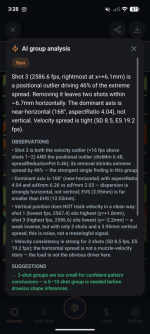
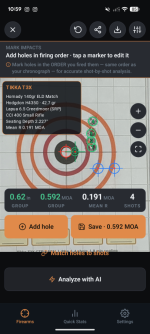
Hi. LoadNode already does this with AI Group analysis feature. It was a feature designed and develop from the very begining. Please see screenshot below (just an example). In the latest release AI analysis was greatly enhanced as well. Impacts are marked from photo taken prior or straight by taking a photo right in the app. Auto impact recognition can be done but you want your marked impacts to corelate to the shot numbering and software can't know which shot on the photo was first, next, etc. since this is all corelated to the velocities recorded and used for the most accurate group analysis result
I tried to use it today at the range, but could not get it to connect with my Garmin.
I tried multiple times, but kept getting a code 2 error.
I looked at the website when I got home, looked at the FAQ and did a query, but there was no info on what a code 2 error is.
All of the bluetooth permissions are checked for both apps.
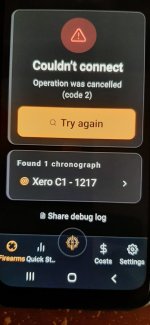
I tried multiple times, but kept getting a code 2 error.
I looked at the website when I got home, looked at the FAQ and did a query, but there was no info on what a code 2 error is.
All of the bluetooth permissions are checked for both apps.
I tried to use it today at the range, but could not get it to connect with my Garmin.
I tried multiple times, but kept getting a code 2 error.
I looked at the website when I got home, looked at the FAQ and did a query, but there was no info on what a code 2 error is.
All of the bluetooth permissions are checked for both apps.
View attachment 1212451
Hi. This is very odd. Is this on Android or on the iPhone? Also, can you please tell me the firmware version of the Garmin C1, you can get this in Settings/About on the unit. I just tried both IOS and Android version and had no issues connecting to the C1 and pulling sessions. Another thing is, please try to go to settings, and remove the paired device from the phone settings, then open the app again, and try to connect, it will ask you to pair the chrono again, just press pair and let me know please if you are able to connect. thank you