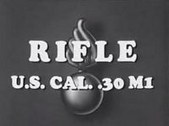
[Training Movies] Rifle Marksmanship with the M1 Rifle (1942)

cjs

CGN Ultra frequent flyer
EE Expired
Rating - 100%
20   0   0
Thought you all would like to watch these - some very high quality formats to download. I did a few searches and couldn't detect any previous posts of this.

Rifle Marksmanship with the M1 Rifle (1942)

http://www.archive.org/details/Rifle_Marksmanship_with_M1_Rifle_Part_1


These are Excellent videos for those who would like to know more about rifle shooting. They are great for both the beginner and the expert who needs a refresher. The series focuses on the M1 garand, but the techniques can be applied to any rifle. part one covers sling usage and shooting positions. Part 2 covers sight adjustments and also has one of the BEST explanations of windage adjustments EVER. The film was made in 1942/43 for the war department and is now in the public domain, so it can be copied and recopied at will. Please give a copy to anyone you may think would be interested in becoming a better shooter then visit www.rwva.org to find out about an APPLESEED shoot.

Special thanks to Jack A Sol of the Revolutionary War Veterans Association for making these videos available to the general public.
 
I saw those a while ago and yes, while I was watching I had my garand in my hands at the time. I was only able to find two to download, with the at least 2 parts per. I wish the first one would be found. The part about sight picture. Apparently it is "missining".
 
Been on-line for about two years now, plus a few other excellent additions to the original set .... :D

In "The Screening Room" (click here)http://www.milsurps.com/forumdisplay.php?f=46, we updated the existing set of wartime U.S. Government produced Garand training videos (over 2 hours).

To the existing entry Rifle Marksmanship with the M1 Garand Rifle (1942 Training Videos and Companion Book), we've added a 1943 official training Film of the U.S. War Department, displaying the principles of operation of the U.S. CAL. .30 M1 Rifle better known throughout WW2 as the “Garand”. Signal Corps ordnance experts demonstrate the intricacy of the firing mechanism behind the most expensive and one of the best rifles of the Second World War.


U.S. CAL. .30 M1 Rifle (1943)
Video length = 15 minutes

(Click PIC for link to MKL entry)


There's some great material in this Knowledge Library entry for collectors who also shoot these old Garand vintage rifles, including a companion training book titled "How to Shoot the U.S. Army Rifle" and other articles on "Snap Shooting" and pics of the "Sighting Training Device".

Regards,
Badger
 
Great stuff - While I appreciate the wealth of info you have on your site (joining now), I wish the videos could be downloaded.

Flash streaming is great for bandwidth saving but I prefer to download WMV, and then burn to DVD and keep on hand for long term playback at cabins, cottages, hunting cabins etc where there is no internet access... (solar power + small dvd laptop = good)...

Wish I could find the M1 Garand Handling (Stripping & Assembling) video in WMV format.
 
Great stuff - While I appreciate the wealth of info you have on your site (joining now), I wish the videos could be downloaded.

Flash streaming is great for bandwidth saving but I prefer to download WMV, and then burn to DVD and keep on hand for long term playback at cabins, cottages, hunting cabins etc where there is no internet access... (solar power + small dvd laptop = good)...

Wish I could find the M1 Garand Handling (Stripping & Assembling) video in WMV format.

VLC FLV TO WMV

How to convert .FLV(Flash) to .WMV, .AVI or any other format?


VLC player is one of the software which is widely used and which plays any format of audio or video (including .flv). The less known fact is that it also helps to convert audio and video file formats. Follow these steps to convert .flv to .wmv, .avi or any other format.

Note: If you don’t have VLC player yet, then you can download from VideoLan. It’s an open source!

Step 1: Load the .flv file into VLC player and press Stop. (If you are using large file then it may take some time to load, so wait till the whole file is loaded and then press stop. Otherwise you may not be able to transcode the full file)
Step 2: Go to File -> Wizard. It will give you a pop-up ‘Streaming/Transcoding Wizard‘.
Step 3: Select Transcode/Save to file and Click Next.

Transcoding Wizard

Step 4: Select Exisiting Playlist Item and the file you have just loaded will be listed there.
Step 5: Highlight the .flv file and click Next.

Highlight FLV file

Step 6: In the next screen, Select Transcode Video and from the drop down box choose WMV3 (this has highest quality, though the output of the file may differ as per the original .flv file). If you are having problem with WMV3, try using WMV2.
Step 7: Select Transcode Audio and from the drop down box choose MP3 (for the quality to be higher, leave it at the default bitrate of 192) and click Next.

Transcode Video and Audio

Step 8: choose ‘ASF‘ as the ‘Encapsulation Format‘ and click Next.
Step 9: You will be asked to select the file to save to, click ‘Choose‘ and browse to the folder where you want your new file to be saved.
Step 10: !!!Important!!! Type in the file name in the ‘File’ field with the extension of .WMV (example, lytebyte.wmv)
Step 11: Click Finish and wait for couple of seconds and the new file is ready.
Step 12: Use the new .WMV file in any player!
 
Thanks! I had used a different conversion process that involved a free version that was fixed at medium quality - unless you buy their pro version - and will try this tonight.

Was looking for an open source method. I appreciate it.
 
I use this Vid converter...

w w w.gogago.net/

Mind you the MP4 files are quicktime so no big deal if you have it installed on your PC.

Then just right click save link...
 
Back
Top Bottom