












































3D printer... Electronics... DIY "LASER" target.... shot timer.... hit counter....
Hey Guys and Gals,
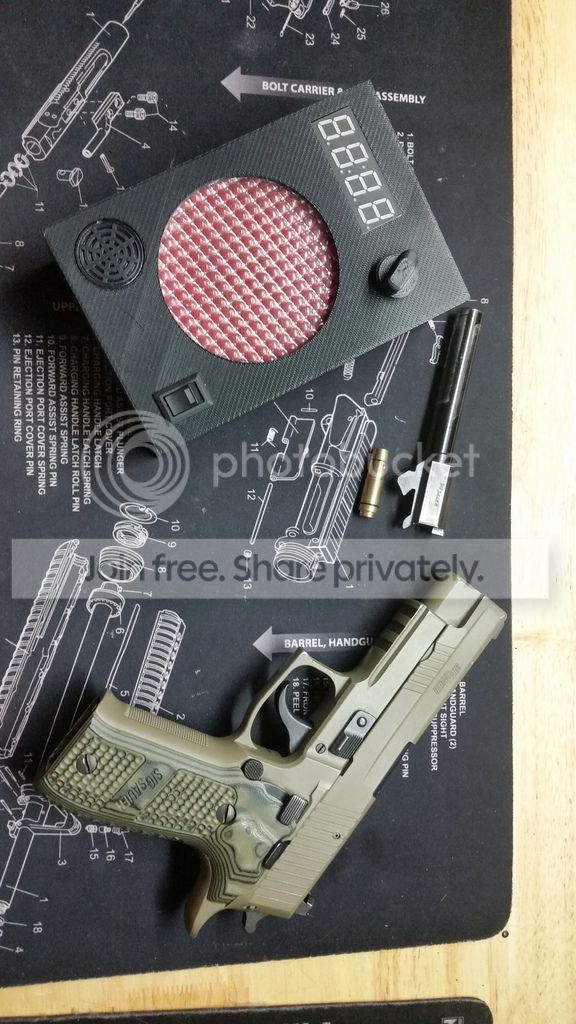
I have been working on a new DIY project, of a hit counting laser target, with added functionality of a shot timer. It still has a way to go, but I am pretty optimistic.
My intent was to design a target that uses an "off the shelf" dry fire laser bullet, and that could select between a few different modes.
So far I have a hit counting program that just counts hits continuously, and a quick-draw shot timer that will let you know your draw - and effective hit on target - time.
I designed the box to be 3d printed, and use LDR (light dependant resistors) to trigger the electronics. I decided to use an Arduino Uno R3 (small micro controller - or very basic programable computer for the non-tech people) and set to work.
Here is the result (so far):
Here is a picture of my computer screen, with the 3D CAD design:
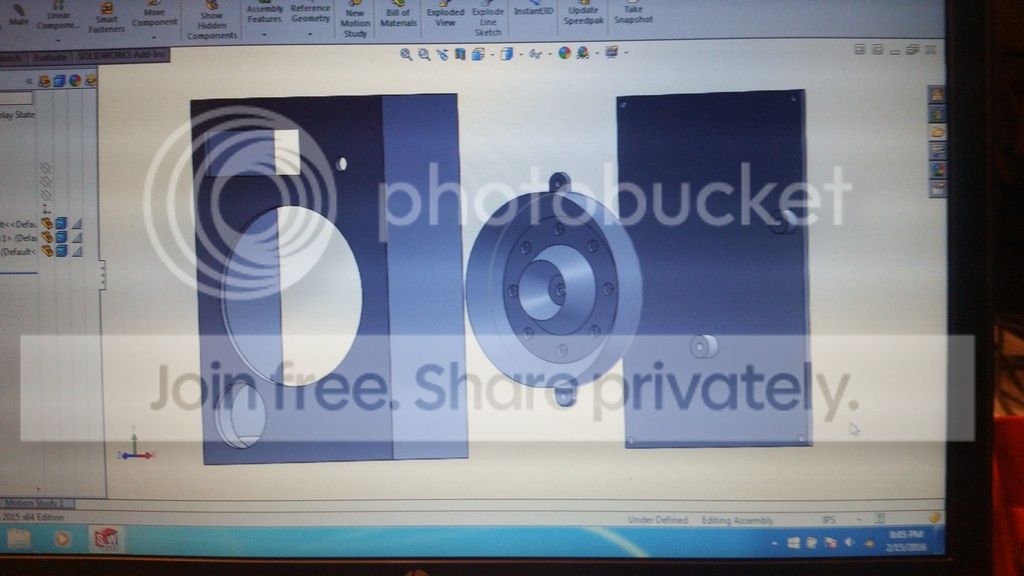
you can see the design of the laser receiver, with space for nine LDRs. I had intended to expand the program to make the centre sensor register differently than the outer ones, but due to me being a beginner in computer programming, I decided to make it simple for now.
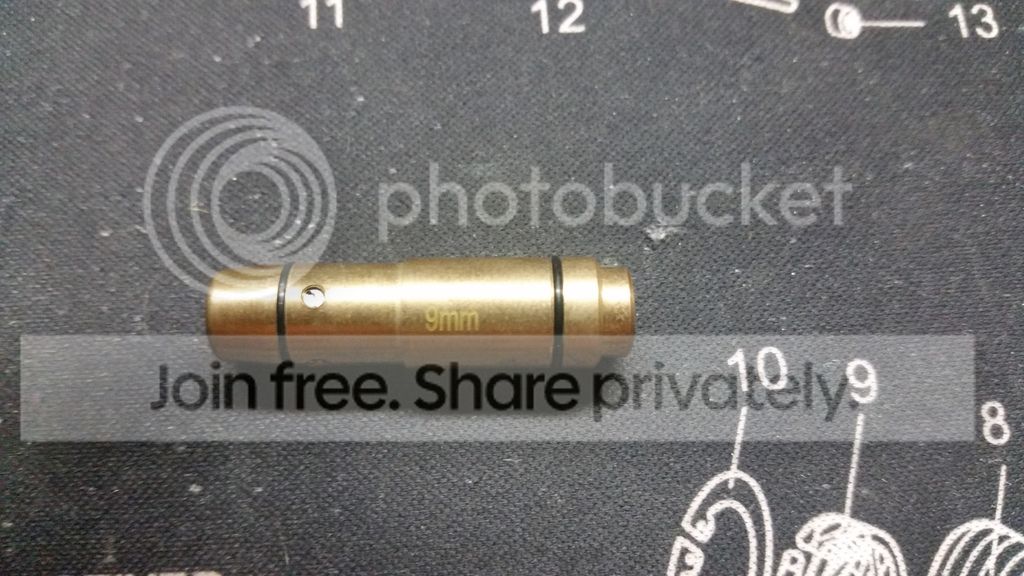
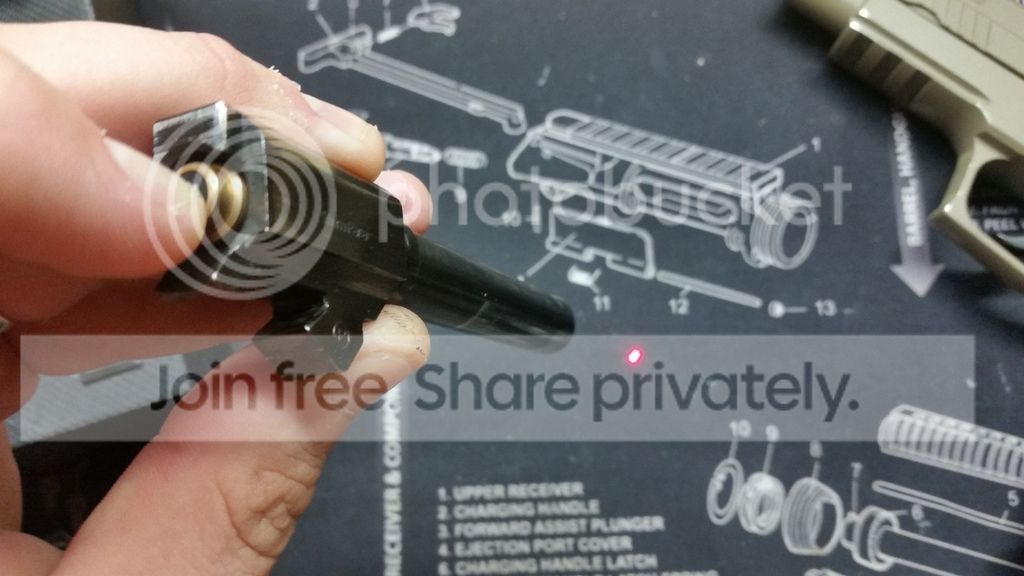
So the key to this whole system, is the 9mm laser bullet which is basically a small laser pointer, it works by having a small pressure switch in place of a primer, and it turns on the laser as long as the firing pin hits the "primer"
Due to the very small amount of time the firing pin actually presses against the "primer" the laser pulse is only on for about 200 milliseconds, so you must be very accurate.
Here is a picture of the laser round:
And here is one of the round in the chamber with me holding the pressure switch down:
Inside I have a bit of a rat's nest of wire and bits (this is a prototype, and I will clean it up eventually)
You can see the Arduino micro controller, battery, display, and hot glue...
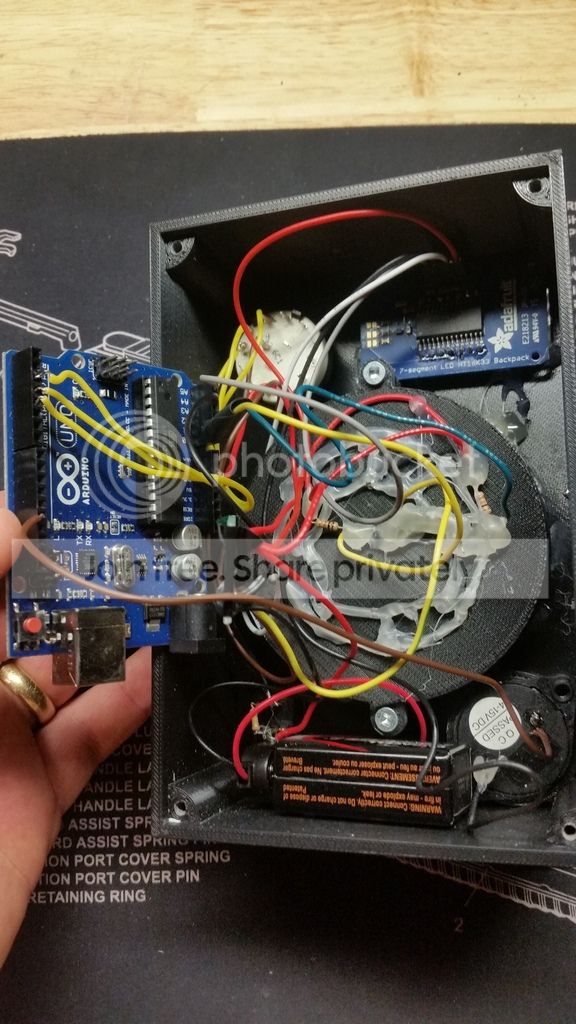
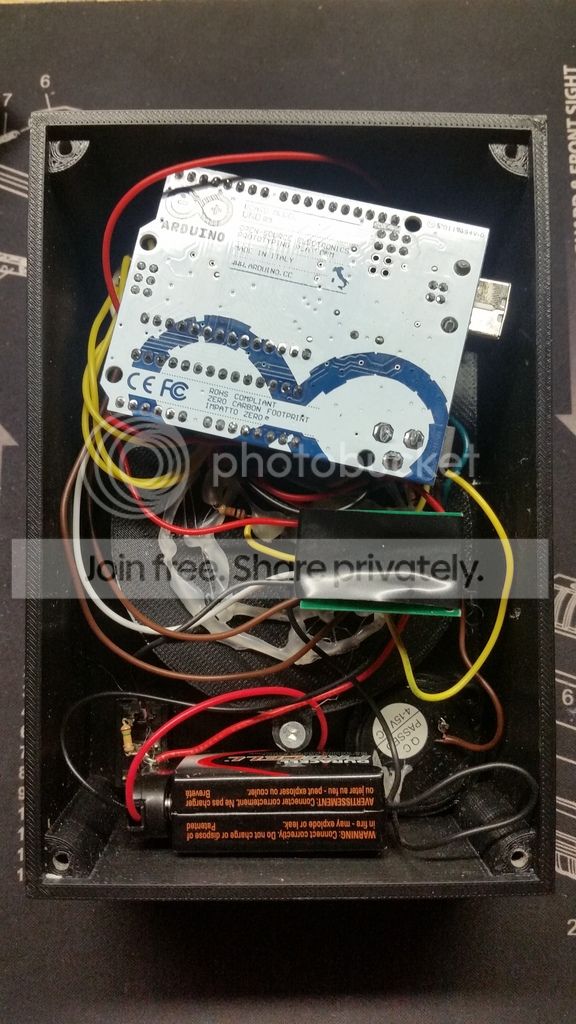
So here is the important part, Does it work?
Yes.
Here is a demonstration of the quickdraw program:
Once it is switched on, it will beep and display "8888" until it is calibrated - which is 5 seconds of sensing the ambient light level in the room
The target then beeps, and displays a "0" to let you know it is ready.
Then there is a random delay of between 5 and 10 seconds, followed by a continuous beep which is your queue to draw/engage.
I have another program written that just counts hits, but I find the quickdraw is a much harder game.
Currently I am working on the ability to switch programs with the selector switch on the front, and eventually I would like to have a game where a timer counts down from 10 seconds, while counting your max hit number.
The training objectives will be :
Hit count = Program 1
Quickdraw = Program 2
Total hits in "x" seconds = Program 3
Rather than a regular shot timer where the system registers sound, but not accuracy, this system measures both reaction time and accuracy.
And the 3" target face is a challenging target the farther away you place it.
I started dry firing to improve my accuracy, and I have to say this system has done wonders for my accuracy. I am able to reliably hit the 3" target at 19m (across my apartment). It is also great because you are forced to slow down and aim on the draw, (my first few tries at 5m were met with misses, but now I can reliably hit at 1.3 seconds)
It has been a fun project, and I look forward to improving it as I go.
Thanks for taking the time to read.
Daver
And in case anyone is interested in the program I wrote (or partially grabbed from another program) here is the quickdraw one:
#include <Wire.h>
#include "Adafruit_LEDBackpack.h"
#include "Adafruit_GFX.h"
Adafruit_7segment matrix = Adafruit_7segment();
int SensorPin1 = A0; // the number of the Photosensor pin
int Beeper = 13; // the number of the Beeper pin
int count; // Count the button presses
int SensorState1 = 0; // variable for reading the Sensor status
int LastSensorState1 = 0;
int sensorValue = 0; // the sensor value
int sensorMin = 1023; // minimum sensor value
int sensorMax = 0; // maximum sensor value
// timer variables
float CurrentMillis;
float HitMillis;
float Time;
unsigned long StartTime;
unsigned long EndTime;
void setup() {
// initialize the display
matrix.begin(0x70);
Serial.begin(9600);
matrix.print(8888);
matrix.writeDisplay();
delay(100);
// initialize the sensor pin as an input:
pinMode(SensorPin1, INPUT);
pinMode(Beeper, OUTPUT);
int count = 0;
// calibrate during the first five seconds
while (millis() < 5100) {
matrix.print(8888);
matrix.writeDisplay();
sensorValue = analogRead(SensorPin1);
// record the maximum sensor value
if (sensorValue > sensorMax) {
sensorMax = sensorValue;
}
// record the minimum sensor value
if (sensorValue < sensorMin) {
sensorMin = sensorValue;
}
matrix.print(8888);
matrix.writeDisplay();
delay(500);
}
}
void loop(){
matrix.print(0000);
matrix.writeDisplay();
digitalWrite(Beeper, HIGH);
delay (100);
digitalWrite(Beeper, LOW);
delay (100);
digitalWrite(Beeper, HIGH);
delay (100);
digitalWrite(Beeper, LOW);
delay (random (3000,5000));
//delay (1000);
digitalWrite(Beeper, HIGH);
CurrentMillis = millis();
StartTime = millis();
EndTime = StartTime;
while ((EndTime - StartTime) <=10000) {
SensorState1 = analogRead(SensorPin1);
if (SensorState1 < sensorMin){
Serial.println (sensorMin);
Serial.println (sensorMax);
Serial.println (SensorState1);
}
if (SensorState1 != LastSensorState1 ){
if (SensorState1 < sensorMin) {
HitMillis = millis();
digitalWrite(Beeper, LOW);
Time = ((HitMillis - CurrentMillis) / 1000 );
matrix.print(Time);
matrix.writeDisplay();
Serial.println("Time is");
Serial.print(Time);
Serial.println("in seconds");
delay (5000);
LastSensorState1 = SensorState1;
break;
}
}
LastSensorState1 = SensorState1;
}
LastSensorState1 = SensorState1;
}
Hey Guys and Gals,
I have been working on a new DIY project, of a hit counting laser target, with added functionality of a shot timer. It still has a way to go, but I am pretty optimistic.
My intent was to design a target that uses an "off the shelf" dry fire laser bullet, and that could select between a few different modes.
So far I have a hit counting program that just counts hits continuously, and a quick-draw shot timer that will let you know your draw - and effective hit on target - time.
I designed the box to be 3d printed, and use LDR (light dependant resistors) to trigger the electronics. I decided to use an Arduino Uno R3 (small micro controller - or very basic programable computer for the non-tech people) and set to work.
Here is the result (so far):

Here is a picture of my computer screen, with the 3D CAD design:

you can see the design of the laser receiver, with space for nine LDRs. I had intended to expand the program to make the centre sensor register differently than the outer ones, but due to me being a beginner in computer programming, I decided to make it simple for now.
So the key to this whole system, is the 9mm laser bullet which is basically a small laser pointer, it works by having a small pressure switch in place of a primer, and it turns on the laser as long as the firing pin hits the "primer"
Due to the very small amount of time the firing pin actually presses against the "primer" the laser pulse is only on for about 200 milliseconds, so you must be very accurate.
Here is a picture of the laser round:

And here is one of the round in the chamber with me holding the pressure switch down:

Inside I have a bit of a rat's nest of wire and bits (this is a prototype, and I will clean it up eventually)
You can see the Arduino micro controller, battery, display, and hot glue...


So here is the important part, Does it work?
Yes.
Here is a demonstration of the quickdraw program:
Once it is switched on, it will beep and display "8888" until it is calibrated - which is 5 seconds of sensing the ambient light level in the room
The target then beeps, and displays a "0" to let you know it is ready.
Then there is a random delay of between 5 and 10 seconds, followed by a continuous beep which is your queue to draw/engage.
I have another program written that just counts hits, but I find the quickdraw is a much harder game.
Currently I am working on the ability to switch programs with the selector switch on the front, and eventually I would like to have a game where a timer counts down from 10 seconds, while counting your max hit number.
The training objectives will be :
Hit count = Program 1
Quickdraw = Program 2
Total hits in "x" seconds = Program 3
Rather than a regular shot timer where the system registers sound, but not accuracy, this system measures both reaction time and accuracy.
And the 3" target face is a challenging target the farther away you place it.
I started dry firing to improve my accuracy, and I have to say this system has done wonders for my accuracy. I am able to reliably hit the 3" target at 19m (across my apartment). It is also great because you are forced to slow down and aim on the draw, (my first few tries at 5m were met with misses, but now I can reliably hit at 1.3 seconds)
It has been a fun project, and I look forward to improving it as I go.
Thanks for taking the time to read.
Daver
And in case anyone is interested in the program I wrote (or partially grabbed from another program) here is the quickdraw one:
#include <Wire.h>
#include "Adafruit_LEDBackpack.h"
#include "Adafruit_GFX.h"
Adafruit_7segment matrix = Adafruit_7segment();
int SensorPin1 = A0; // the number of the Photosensor pin
int Beeper = 13; // the number of the Beeper pin
int count; // Count the button presses
int SensorState1 = 0; // variable for reading the Sensor status
int LastSensorState1 = 0;
int sensorValue = 0; // the sensor value
int sensorMin = 1023; // minimum sensor value
int sensorMax = 0; // maximum sensor value
// timer variables
float CurrentMillis;
float HitMillis;
float Time;
unsigned long StartTime;
unsigned long EndTime;
void setup() {
// initialize the display
matrix.begin(0x70);
Serial.begin(9600);
matrix.print(8888);
matrix.writeDisplay();
delay(100);
// initialize the sensor pin as an input:
pinMode(SensorPin1, INPUT);
pinMode(Beeper, OUTPUT);
int count = 0;
// calibrate during the first five seconds
while (millis() < 5100) {
matrix.print(8888);
matrix.writeDisplay();
sensorValue = analogRead(SensorPin1);
// record the maximum sensor value
if (sensorValue > sensorMax) {
sensorMax = sensorValue;
}
// record the minimum sensor value
if (sensorValue < sensorMin) {
sensorMin = sensorValue;
}
matrix.print(8888);
matrix.writeDisplay();
delay(500);
}
}
void loop(){
matrix.print(0000);
matrix.writeDisplay();
digitalWrite(Beeper, HIGH);
delay (100);
digitalWrite(Beeper, LOW);
delay (100);
digitalWrite(Beeper, HIGH);
delay (100);
digitalWrite(Beeper, LOW);
delay (random (3000,5000));
//delay (1000);
digitalWrite(Beeper, HIGH);
CurrentMillis = millis();
StartTime = millis();
EndTime = StartTime;
while ((EndTime - StartTime) <=10000) {
SensorState1 = analogRead(SensorPin1);
if (SensorState1 < sensorMin){
Serial.println (sensorMin);
Serial.println (sensorMax);
Serial.println (SensorState1);
}
if (SensorState1 != LastSensorState1 ){
if (SensorState1 < sensorMin) {
HitMillis = millis();
digitalWrite(Beeper, LOW);
Time = ((HitMillis - CurrentMillis) / 1000 );
matrix.print(Time);
matrix.writeDisplay();
Serial.println("Time is");
Serial.print(Time);
Serial.println("in seconds");
delay (5000);
LastSensorState1 = SensorState1;
break;
}
}
LastSensorState1 = SensorState1;
}
LastSensorState1 = SensorState1;
}
Last edited: