Building an app for handloading...

yoink

Member
Rating - 100%
1   0   0
Location
New Brunswick
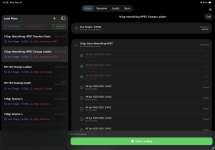
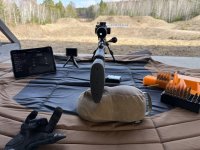
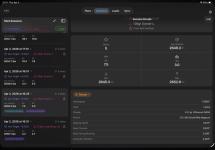
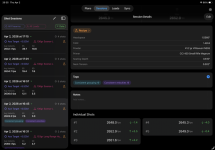
Hey folks, I'm working on an app for handloading/load development and more and I wanted to share some of what I'm working on in case anyone here is interested in trying it. Some of the screenshots are from an iPad and some from an iPhone.
IMG_1376.PNG
IMG_1377.PNG

A few caveats before I even get to the app:
  • Currently iOS only (iPhone and iPad)
  • Chronograph supported: Athlon Rangecraft
  • No iCloud Sync at the moment

The Genesis (or why I built it):​

Easy, I really like my Rangecraft Chronograph. I really DON'T like the Athlon Ballistics app. When I started handloading, I found the app less than ideal to reconcile my shot sessions. Additionally, the app didn't work in a way I liked, but that's just a preference thing. I also had strugged to remeber which notebook I wrote my stuff down in. Once I left a notebook at the range and didn't find it again... so yeah, a mix of stupidity, laziness, and here we are.

What it does​

Well, a lot. But at the heart of the app, it allows me to create load development or shot plans and then run through them, keeping detailed records of what I did, what were the individual settings/parameters, and how it worked out.

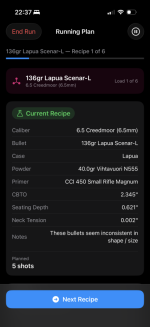
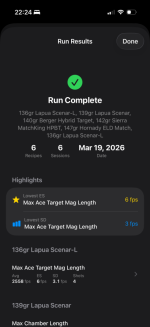
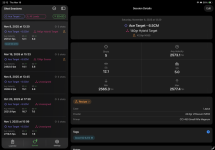
Here's a video (snippet) of the app running through a shot plan. All I need to do is start a new session on the chronograph and the app advances to the next planned shot string. This way the app moves through the loads and recipes I have planned, imports each session and shows shot data directly from the device. If I (or you!) are so inclined you can add notes about the group, or recoil or anything else before advancing. It's also possible to disable auto-advance, and the app the will remind you to start a new session.
What it doesn't do​

Ballistics calculations. There are a bazillion apps out there. We don't need another one.

More details​

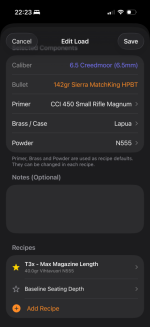
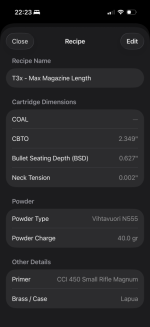
The app helps keep records of all the parameters of load recipe (case, powder, bullet, primer, charge weight, seating depth, neck tension... everything), along with notes and addition details.
IMG_5724.PNGIMG_5723.PNG
(Note: for load recipes, you only need to fill out what you're focused on. All fields are option. Recipes can also be easily "cloned" from each other so you can take a recipe and clone it, then just change the one parameter you're focused on.)

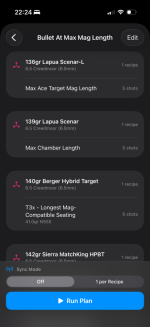
From there it allows me to create a plan of how I intend to work through those loads at the range, and then run that plan. I can take notes along the way. Eventually I plan to add the ability to include photos (say of shot groups), to further reconcile the data and make decisions about load data.
IMG_5725.PNGIMG_5729.PNGIMG_5726.PNG

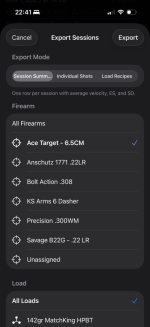
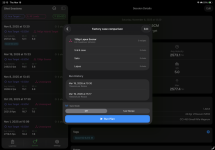
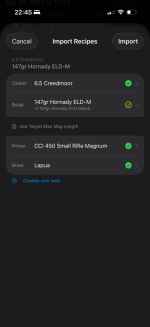
It does a lot more. It improves on a number of things I believe are missing from Athlon's app. It allows me to assign a firearm and load to the sessions that are downloaded off the Chronograph, before they're downloaded. It also allows me to export (and import) load data and load recipes. This makes it easy for sharing or record keeping.
IMG_5735.PNGIMG_5732.PNG


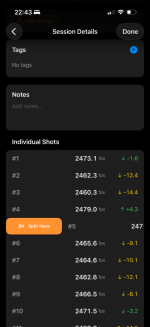
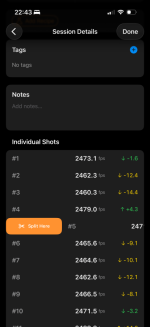
It allows me to split up shot sessions, so if I'm being really lazy and I just leave my chronograph recording at the range, I can reconcile everything at home, after the fact.
IMG_5733.PNGIMG_5733.PNG


It's been designed to have a painless workflow. If you're at a screen to select a load or recipe and you need to create a new one, you can do it right there. Basically, it contains everything I need or want for keeping track of how my loads are developed and behaving with as little friction and as much flexibility as possible.

Interested?​

If you're at all interested I plan on cleaning up the app (found a few bugs at the range today) and then making it available through Test Flight (Apple's beta testing tool in the App Store). I'll keep this thread updated with when it's available for download. The betas will require an email address (Apple's requirements, not mine) but they'll all be completely free. I'm looking for just a handful of interested folks to start, and then add more people as the app gets more stable, eventually releasing it publicly (but that's a ways away).

It's only a week or two old, so it's going to get a lot of updates, and I'll post them here as I make them.

Quick FAQ​

  1. Can I use it without an Athlon Rangecraft, to keep records of my loads/shot sessions/etc?
    Yep. It will work without it! I have a few minor tweaks to complete to make that work nicely, but that was always the plan.

  2. Will it support Android?
    Depending on how much response / interest there is, I'm strongly considering an Android version. My primary programming language is Scala, and I've wanted to learn Kotlin for a while, so this would be the chance.

  3. Will it support Garmin devices?
    I'd love to. I'm hoping I can find someone at one of my local ranges who's willing to lend me a Garmin so I can have a whack at reverse engineering the bluetooth protocol it uses.

  4. iCloud Sync / Does it sync between devices?
    Not at the moment. The app's been built to support it . I'm also considering a direct device-to-device export/import option. Ultimately, it will probably end up with both options, one for the privacy conscious who don't want any more data in the cloud (cough online forum coughsmartphone app cough), and one for those who want convenience.
 
Couple of things worth adding.

Headspace for the rifle and the case after sizing. ie. we want to set our dies to produce a couple thou of shoulder setback ... thus we need a place to record he fired case headspace as well as the sized case headspace.

Also kinda need essentially the same info for the bullet seating depth. That is we want to record the jump to the lands so we need the measured distance to the lands as well as the seating depth and thus the difference between the two - which is the jump.

A note in the powder charge field would be nice. So one could add in a couple of notes, like the max book load or what powder charge setting was used etc.
 
Last edited:
I just bought an Athlon Rangecraft. I haven’t tried it yet but I did notice their app was lacking. I am looking forward to yours when it becomes available.
 
Couple of things worth adding.

Headspace for the rifle and the case after sizing. ie. we want to set our dies to produce a couple thou of shoulder setback ... thus we need a place to record he fired case headspace as well as the sized case headspace.

Also kinda need essentially the same info for the bullet seating depth. That is we want to record the jump to the lands so we need the measured distance to the lands as well as the seating depth and thus the difference between the two - which is the jump.

A note in the powder charge field would be nice. So one could add in a couple of notes, like the max book load or what powder charge setting was used etc.
Super helpful. I'm going to retool the whole hierarchy a bit because headspacing was a big miss on my part. I'm currently only reloading for one rifle. As a result I've got mine down and wasn't thinking about it. But the whole idea was for multiple so thanks for that.

When you say powder charge setting, do you mean what the relative measurement was on a powder thrower, or something else? I use a powder thrower so either way this reminded me that it would be helpful to have all that in one place. Still, I'm not exactly sure I understood this one.

You can't see it on my screen shot but each load recipe has a free form notes entry at the bottom that carries over to every shot session that recipe was used on. One decision I have to make is "where are general notes fine" vs. "where do we need a specific note related directly to a measurement."

Appreciate the feedback!
 
Ladder testing is possible now, just not with interactive Rangecraft use. :) I'm relying on a quirk of the the underlying hardware / firmware for what's seen in the video with auto-advance, but you one could easily plan a ladder, with a record of powder charges or seating depths and run through it, then take a monolithic chronograph session and split it up. Lots of options already.

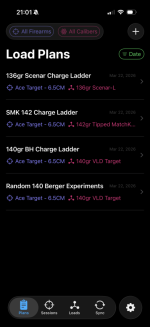
For ladder testing I just leave my chrono up, with one session, instead creating a bunch of 1 shot sessions. I wonder what other folks do?

There are a couple a ways already to run through load development plans - but next iteration at the range I'll do both charge and seating depth ladder run for app testing at 400y and report back/share the workflow for feedback.
 
Great Project!

I remember talking with a friends husband when app development was still a new thing close to 20 years ago now!

He was really in to it and hungry for ideas to develop and said if I ever had any ideas to pass them along to him..... pretty wild that today all a person needs is a pipe dream and a few LLM's with the microphone turned on!

It's a new golden age for dreamers with ideas but no real follow through capabilities.
 
Great work!
I know its a big ask but any chance we can get garmin xero integration?

If not, am i able to enter speeds/sd/es manually?

I would love to give this a try - i have been looking for something to catalog and compile data/loads
 
For ladder testing I just leave my chrono up, with one session, instead creating a bunch of 1 shot sessions. I wonder what other folks do?
If I have five loads to test, I have five Series set up and move between them. This way each series is showing the SD and is distinct for when/if I upload to a PC for records / analysis. And I'm not doing statistically-invalid things like 3-shot groups. Usually ten for each series.
 
When you say powder charge setting, do you mean what the relative measurement was on a powder thrower, or something else?
Yes, this is exactly what I meant. It was late and my brain stopped working. :rolleyes:

Some powder measures or powder drop systems have discrete settings or clicks or even volumetric cavities. For example I use the Lee Auto Disk for many of my pistol loads and it would be helpful to be able to record the disk cavity size for future reference.
 
Yes, this is exactly what I meant. It was late and my brain stopped working. :rolleyes:

Some powder measures or powder drop systems have discrete settings or clicks or even volumetric cavities. For example I use the Lee Auto Disk for many of my pistol loads and it would be helpful to be able to record the disk cavity size for future reference.
No worries, I appreciate your PoV here. I use a Forster Bench Rest powder measure, so this is a feature that I need as well.

In fact your whole comment made me go back and rebuild how we interact with the app. I'll share a big update in the coming days. The app was too chronograph-focused, when my goal was load development.

Appreciate it.
 
Great work!
I know its a big ask but any chance we can get garmin xero integration?

If not, am i able to enter speeds/sd/es manually?

I would love to give this a try - i have been looking for something to catalog and compile data/loads
Indeed, I know I threw a lot up in that first post, but as per the F.A.Q, as soon as I can find someone at one of my local clubs with a C1 or C2 (ideally both) I can try, I'll give it a go at reverse engineering the bluetooth protocol.
 
If I have five loads to test, I have five Series set up and move between them. This way each series is showing the SD and is distinct for when/if I upload to a PC for records / analysis. And I'm not doing statistically-invalid things like 3-shot groups. Usually ten for each series.
Super helpful. Thank you.

My goal is to get back out to the range and focus specifically on ladder-style development next week if the weather allows. Spent the morning making cartriges to get ready for it. :giggle:
 
Indeed, I know I threw a lot up in that first post, but as per the F.A.Q, as soon as I can find someone at one of my local clubs with a C1 or C2 (ideally both) I can try, I'll give it a go at reverse engineering the bluetooth protocol.
Ah dang apologies. Thats awesome. I’d live to see that.
 
In fact your whole comment made me go back and rebuild how we interact with the app. I'll share a big update in the coming days. The app was too chronograph-focused, when my goal was load development.
NP, I have been keeping my loading data in an MS Word based system with pages all linked together. It s wee bit clunky but it allows me to keep a lot of data in an easily accessible format.

Something I have found useful is a page where I can input load data from different load manuals and other sources. Then I have a bunch of different recipes for a specific bullet weight I can choose from rather than go back to all those manuals time after time.
 
FWIW if you figured out a really good reloading app, it would spur me to potentially purchase a new iPad.

The computer I am currently using is really old and my iPad is now also so old it cannot be updated further.

Lastly, a means to backup all the data is probably critical as things get old or wear out etc and then you lose all your data. I have load data that is 25+ years old in my system.
 
Backups are certainly on my mind. Right now, everything can be exported to CSV for use in excel/libreCalc/google sheets, etc.,

If I do add icloud sync functionality (so everything can be sync'ed between a phone and tablet) we'd also get backups for free, provided I don't mess something up and screw up the data!

That said, a few big changes over the last couple of days based on the feedback here, all of which I'm incredibly grateful for.

The biggest change is the main layout. Even though my plan for this app centred around load development and shot plans, my initial layout was still too chronograph-centric. That's not really why I wanted to build this; I wanted a recipe book where I can track, log and recall all my settings/weights/measures.

So voila, a new main navigation that puts development/shot plans front and center. We continue to get immediate access to session data from a chronograph as well as the load library (which was there, but wasn't exposed like it is now.).

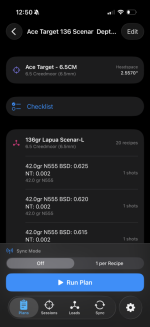
The most significant improvements in image form:

IMG_5745.PNG
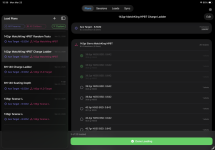
Main navigation is now between plans, sessions, and loads.

My thinking here is that I usually head to the range with a couple of plans, and the cartridges laid out to execute them. They might not always be load development. Sometimes my plan is to use an existing recipe/load and simply practice. I tend to already go with my plan in mind, and typically load for my planned shots.

I've made the plans firearm and load centric. The plans now list the firearm we're loading for.

IMG_5746.PNGIMG_5748.PNG
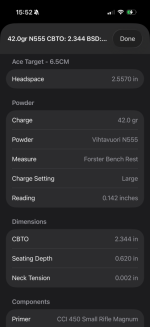
There are a couple of things worth noting here. All based on feedback.

- The recipe now contains headspace of the rifle it's being matched to. This info is stored with the firearm, but appears in a recipe to make loading as easy as possible (everything in one place)

- If you use a powder thrower instead of a dispenser, you can now enter the reading here. My powder thrower has an imperial vernier scale built in, hence inches, but when you setup a powder thrower (you can setup as many as you want) you can chose "marks", "ticks" etc for custom readings.

- The powder thrower reading has a fun trick up its sleeve. Once you've entered two or more readings for a specific powder thrower AND specific powder, it will begin to make suggestions regarding what you should consider as a setting for a given charge. You read that right, put in the charge weight you want, the powder thrower you're using, and it'll suggest a starting point, using linear regression (not AI!) if you have three or more readings for that thrower/powder combo. It needs some more testing, but it's working.

- There's a new checklist function to help with actual loading:

IMG_1381.PNG
I often get interrupted while loading with, uh, life. So now, any plan I come up with also doubles as a checklist. The checklist persists across app quits, until it's marked done. That way we can always know where we left off.

If you look closely at the above checklist image you'll see it's a charge ladder plan. It looks tedious to setup.

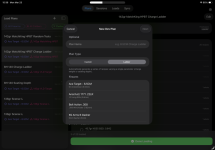
But it's not! Again, thanks to the feedback here, I've also added a “ladder” wizard. I went to make my ladder(s) for this week's test session, and it was super tedious to copy every recipe and go increment the charge weight by 0.3gr. So, now it does it for you.

IMG_1382.PNG
When you go to create a new shot plan, then choose ladder, it asks you to pick a starting load recipe. The, if it's a charge ladder, you can set the starting charge weight (ex. 40gr), the increment (ex. 0.3gr) and the number of iterations (ex. 20). It'll create the 20 recipes for you. You can also set a min and max charge and it'll fill in between with the requested increment.

It will do the same for seating depth, and, because for seating depth I often start jammed or just off the lands and work backwards, the app allows you to do it any way you want.

So, now the real question: getting it into YOUR hands.

My plan is to go to the range this week (again weather permitting—it's still apparently winter here) to see if I fixed last week's bugs and if these new additions work the way I think they should. If that works, I'll start the process of getting the app up on test flight so y'all can give it a whirl.

The first test flight release usually takes a bit of time from Apple to get approved, but I'll keep everyone posted.
 

Attachments

  • IMG_1381.PNG
    IMG_1381.PNG
    128.4 KB · Views: 0
Went out to the range today to do some final testing before the goes up on Test Flight. I wanted iCloud sync to work, as it was getting tedious to export everything in CSV.

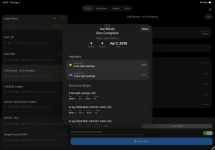
I was able to plan a number shots, mostly experimenting with seating depth, and neck tension. Everything worked perfectly, the app captured the shot sessions as I went, importing the sessions as they were complete, and linking them to the load, rifle, etc. Everything I wanted from the Athlon app but didn't get.


IMG_5784.jpeg

The big changes are:

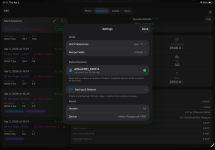
- iCloud sync works; flipping between an iphone and ipad will have all data synced automatically.

- Backup & Restore option separate from icloud, allows for backup even for those who don't want to use icloud sync/cloud backups.

- Recipes (which someone suggested I should rename to Formulas) now can include more optional fields, including use of an expander ball, neck sizing bushing, mandrel sizing, and more. Users can configure what the default fields are that they use regularly, but can always dynamically add or remove them for their recipes/formulas depending on what they use. I use both a mandrel and different neck sizing bushings depending on the case, so these were important for me and I figured others might want them as well.

- If the live connection with a chronograph fails, the shooter can continue their live load development session, take notes/etc without having to stop to debug anything.

Other than that it's all minor workflow tweaks and a ton of bug fixes to make sure it's usable for others. Will take another week before it's up and available on Test Flight, but I'm confident it's in a state that's usable by others, and a state where I can fix any bugs that come up.

As for Android; once this iOS version gets solid, I'll begin that work. Probably a few months away TBH.

Some updated screenshots (mostly auto-imported sessions) from my testing (of both the app and my hand loads):IMG_1392.PNGIMG_1386.PNGIMG_1391.PNG

IMG_1390.PNG
 
Back
Top Bottom