











































You are using an out of date browser. It may not display this or other websites correctly.
You should upgrade or use an alternative browser.
You should upgrade or use an alternative browser.
Got fed up with the notebook and a pile of spreadsheets, so I wrote my own reloading log
- Thread starter spectrality
- Start date
my unit is 3.4, i will try to update and check again. Unfortunately all my android devices are Android 16+, i will try to find an Android 11 device to test . let me know when you try it again. thanks
Hey. Its a Samsung Galaxy A50, Android 11. The Garmin is a C1, software version 3.44 ( I always check for update prior to going to the rge). I will try to re-pair tomorrow and let you know what the result was.
Thanks.
Hey. Its a Samsung Galaxy A50, Android 11. The Garmin is a C1, software version 3.44 ( I always check for update prior to going to the rge). I will try to re-pair tomorrow and let you know what the result was.
Thanks.
I just looked up this in details.
"Code 2" means the connection to your C1 didn't finish in time: the app could see the chronograph, but the Bluetooth link wasn't completed before the app stopped waiting. Could you try these, in order?
- Wake the C1 with a button press, then tap Try again and pick the C1 from the list. Keep your phone within a few feet of it.
- Make sure nothing else is connected to it. If Garmin ShotView is on the same phone, close it completely, and turn Bluetooth off on any other phone or tablet that has paired with the C1.
- If it still fails, remove the C1 from your phone's Bluetooth settings, then connect again from LoadNode.
- On a Pixel or similar: Settings, Connected devices, then the gear next to the Xero (it may be under "Previously connected devices"), then Forget.
- On a Samsung: Settings, Connections, Bluetooth, then the gear next to the Xero, then Unpair.
- If the Xero isn't listed there, skip this step. If your phone asks to pair when you reconnect, accept it. A stale Bluetooth pairing can make the connection hang like this instead of failing cleanly.
I'm working on a fix for this and will post here when it's out.
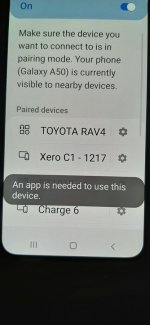
Turning ShotView off did the trick! Thank you very much for the help.
I would turn ShotView on by default because if I didn't, it wouldn't connect and I would get the warning shown below.
Glad to hear. Thanks for the report anyways, i found couple of things that i could tighten up including more clear error messages which can help in those situations. Hope you enjoy the app and let me know if there are any questions.
LoadNode 1.1.20 is out: one recipe on several firearms, a setup list per firearm, and a pile of fixes
A quick update for anyone using LoadNode, or who asked about it earlier.
1.1.20 is out on Google Play and the App Store. It is a big one: most of it came out of
suggestions from this forum and others, so thank you to everyone who took the
time to tell me what was missing or wrong.
**New**
**One recipe on several firearms.** If you run the same load in more than one
firearm of the same cartridge, you no longer keep copies. The recipe keeps the
firearm it was developed on, and each firearm keeps its own results: pooled
stats, load comparisons, the Load Book, session reports and load cards all
show what that firearm actually fired. It checks the cartridge before adding a
firearm, and asks rather than assumes when it does not know it. Deleting the
home firearm moves the recipe to another one instead of deleting it. Free.
**Parts and setup list per firearm (Pro).** Record the parts and setup of each
firearm, with suggestions that fit the kind of firearm it is (AR-pattern, bolt
action, other semi-auto rifle, lever, semi-auto pistol, revolver, shotgun), and
custom parts always allowed. Every new session keeps a copy of the setup as it
was, and tells you when the firearm has changed since. It is in the session
report, the firearm history and the CSV export.
**Build a ladder at the bench.** Turn off "Open shot entry after adding" and
you can add several charges, seating depths or tuner settings in a row before
you shoot, without the shot log opening each time. A new, empty rung offers
"Keep for later" and "Remove". Works on every ladder type, and the app never
proposes a value.
**Counts read the same everywhere.** 1,200 rounds reads 1,200 on every phone,
whatever its region. Before, some regions printed 1.200 next to $2.25.
**Improved**
**Garmin Xero on Android** gets more time to connect, and when another app is
holding the chrono it now says so instead of "Operation was cancelled (code 2)".
**"Firearm", not "rifle" ** everywhere the app means any firearm: screens,
PDFs, the recap and form hints. Pistol and shotgun people, this one is for you.
**Ladders** name their rungs the same way on every screen, report and PDF, and
every screen around a ladder talks about what it actually steps: charge,
seating, neck tension, tuner or primer seating.
**Costs and the dashboard:** sessions with the same name are told apart,
"rounds costed" counts only fully priced rounds, the factory comparison says
which rounds it covers, and the cost card names every gap (a missing price, a
missing charge, mixed currencies). A rung that records a charge of zero or less
is called out instead of quietly priced.
**Inventory:** undated sessions are named once and not deducted, and counts
and wording match the dashboard.
**Photos in Settings:** "Download all for offline use" now sits under Account,
right below the line that says how many photos are waiting in your cloud
backup, and goes away once they are all on the phone.
**The Pro list** in the app now shows exactly what Pro includes, nothing more
and nothing less.
`[AI]` **The AI group analysis** now names each charge exactly as you logged
it (41.567, not 41.6).
**Fixed**
tell me here and I will look at it.
Suggestions are welcome as well: several of
the items above exist because someone in a thread like this one asked for them.
It is under LoadNode on Google Play and the App Store.
A quick update for anyone using LoadNode, or who asked about it earlier.
1.1.20 is out on Google Play and the App Store. It is a big one: most of it came out of
suggestions from this forum and others, so thank you to everyone who took the
time to tell me what was missing or wrong.
**New**
**One recipe on several firearms.** If you run the same load in more than one
firearm of the same cartridge, you no longer keep copies. The recipe keeps the
firearm it was developed on, and each firearm keeps its own results: pooled
stats, load comparisons, the Load Book, session reports and load cards all
show what that firearm actually fired. It checks the cartridge before adding a
firearm, and asks rather than assumes when it does not know it. Deleting the
home firearm moves the recipe to another one instead of deleting it. Free.
**Parts and setup list per firearm (Pro).** Record the parts and setup of each
firearm, with suggestions that fit the kind of firearm it is (AR-pattern, bolt
action, other semi-auto rifle, lever, semi-auto pistol, revolver, shotgun), and
custom parts always allowed. Every new session keeps a copy of the setup as it
was, and tells you when the firearm has changed since. It is in the session
report, the firearm history and the CSV export.
**Build a ladder at the bench.** Turn off "Open shot entry after adding" and
you can add several charges, seating depths or tuner settings in a row before
you shoot, without the shot log opening each time. A new, empty rung offers
"Keep for later" and "Remove". Works on every ladder type, and the app never
proposes a value.
**Counts read the same everywhere.** 1,200 rounds reads 1,200 on every phone,
whatever its region. Before, some regions printed 1.200 next to $2.25.
**Improved**
**Garmin Xero on Android** gets more time to connect, and when another app is
holding the chrono it now says so instead of "Operation was cancelled (code 2)".
**"Firearm", not "rifle" ** everywhere the app means any firearm: screens,
PDFs, the recap and form hints. Pistol and shotgun people, this one is for you.
**Ladders** name their rungs the same way on every screen, report and PDF, and
every screen around a ladder talks about what it actually steps: charge,
seating, neck tension, tuner or primer seating.
**Costs and the dashboard:** sessions with the same name are told apart,
"rounds costed" counts only fully priced rounds, the factory comparison says
which rounds it covers, and the cost card names every gap (a missing price, a
missing charge, mixed currencies). A rung that records a charge of zero or less
is called out instead of quietly priced.
**Inventory:** undated sessions are named once and not deducted, and counts
and wording match the dashboard.
**Photos in Settings:** "Download all for offline use" now sits under Account,
right below the line that says how many photos are waiting in your cloud
backup, and goes away once they are all on the phone.
**The Pro list** in the app now shows exactly what Pro includes, nothing more
and nothing less.
`[AI]` **The AI group analysis** now names each charge exactly as you logged
it (41.567, not 41.6).
**Fixed**
- Target photos now survive an iOS update that moves the app's data folder. Before, a new group's photo could be lost after an update.
- A restore interrupted by a crash, a force-quit or a dead battery is finished at the next launch without losing photos, including restores of older backups.
- Empty or half-written files are never taken for a photo, a retake is never written over another file, and a photo replaced on one device is never deleted by another.
- An erase or account deletion in progress writes nothing back, and a deleted record's photos wait until the deletion is confirmed.- Photos from a backup made on another platform (iPhone to Android and back) no longer fail the photo sync.
- iPhone: fixed the "User interaction is not allowed" error some people hit with a locked Keychain, and a keyboard hang at launch.
- A date, name or number the app cannot read (from a hand-edited backup or another app version) no longer crashes a screen. A firearm or load with no name shows as "Unnamed firearm" or "Unnamed recipe", and a charge that is not a number no longer crashes the group screen.
- A share sheet that gets stuck now frees itself, and a second share while one is open is ignored instead of tripping over the first.
- The recap says "1 round", not "1 rounds", and the dashboard and the PDF now count recipes with a missing charge the same way.
tell me here and I will look at it.
Suggestions are welcome as well: several of
the items above exist because someone in a thread like this one asked for them.
It is under LoadNode on Google Play and the App Store.

LoadNode 1.1.23: shot entry fix
Quick update: 1.1.23 is out on the App Store and Google Play. It fixes a bug in entering velocities that came in with 1.1.0, on both iPhone and Android phones.
When you entered velocities, the keypad could take over the whole screen. The shots you'd already logged and the live SD and ES were squeezed out of view, and tapping "Rounds fired" opened a number keyboard that covered the screen.
What changed:
It's under LoadNode on the App Store and Google Play.
Quick update: 1.1.23 is out on the App Store and Google Play. It fixes a bug in entering velocities that came in with 1.1.0, on both iPhone and Android phones.
When you entered velocities, the keypad could take over the whole screen. The shots you'd already logged and the live SD and ES were squeezed out of view, and tapping "Rounds fired" opened a number keyboard that covered the screen.
What changed:
- The shot list and its stats now stay on screen while you type.
- A small arrow on the velocity box folds the keypad away so you can read the whole string, and tapping the box brings it back.
- "Rounds fired" uses the app's own keypad, so no system keyboard pops up over the log.
- Slightly smaller keys on smaller phones, so more of the log stays visible.
It's under LoadNode on the App Store and Google Play.
Stephen Canuck
New member
- Location
- Lloydminster
What about a way to enter if we test some factory box ammunition and want to do a group analysis to compare to hand loaded ammo? Without having to go through and input it as a load development job.
What about a way to enter if we test some factory box ammunition and want to do a group analysis to compare to hand loaded ammo? Without having to go through and input it as a load development job.
Hi, this is a very good suggestion, let me look into it and ill try to find the way to get this in in the next release. Thanks for a great idea
This is the first 2.x release, and the bigger number is for a reason: LoadNode now works with a second chronograph. Here is everything new since 1.1.23.
Athlon Rangecraft Velocity Pro support (Pro)
If you shoot over an Athlon Rangecraft Velocity Pro, LoadNode can now talk to it directly, the same way it does with the Garmin Xero C1 and C2.
Factory ammunition
A lot of you asked for a way to test factory ammo against your handloads without setting it up as a load development job. You can now:
Group test sessions
A new session type for shooting strings of one load with no ladder to set up.
Factory box pricing (Pro)
Enter a box price and LoadNode shows the cost per round, per 100 and for the session. On the Costs screen, factory loads are compared with your handloads per round and kept out of what you spent loading.
Also new
Athlon Rangecraft Velocity Pro support (Pro)
If you shoot over an Athlon Rangecraft Velocity Pro, LoadNode can now talk to it directly, the same way it does with the Garmin Xero C1 and C2.
- Pair it from the Chronograph screen using the code it shows.
- Tap Sync shots in a shot log to see every session stored on the radar, with its projectile weight, and pull one into your string.
- Run a session on the radar with a shot log open, and each shot lands in the log the moment you fire. There is no Go Live step: start and end the session on the radar as you normally would.
- Connect partway through a session and the shots that follow still land. A later Sync of that session adds only the shots it missed, with no duplicates.
- Works on Android and iPhone.
Factory ammunition
A lot of you asked for a way to test factory ammo against your handloads without setting it up as a load development job. You can now:
- Create a recipe as Factory ammo and enter what is on the box: product, maker, bullet, lot, and optionally the box price and rounds per box.
- See factory loads marked as such in your recipe lists, and put them beside your handloads in Compare loads (Pro).
- Keep your inventory honest: factory loads never take components from it.
Group test sessions
A new session type for shooting strings of one load with no ladder to set up.
- Pick a factory load and the session becomes a group test automatically.
- You can also choose Group test for a handload you have already settled on.
- Add strings as you shoot. Group Analysis (Pro) pools them into one group and compares the strings.
Factory box pricing (Pro)
Enter a box price and LoadNode shows the cost per round, per 100 and for the session. On the Costs screen, factory loads are compared with your handloads per round and kept out of what you spent loading.
Also new
- Reports, the firearm history PDF, share cards and the data export all name factory loads and group tests.
- Platform updates and fixes under the hood.
Last edited:
What about a way to enter if we test some factory box ammunition and want to do a group analysis to compare to hand loaded ammo? Without having to go through and input it as a load development job.
You excellent suggestion was implemented in the 2.0.1 release. Available on Google Play already, Apple App store is still going through approval and will be available as soon as Apple approves the release. Thank you for the feedback
LoadNode 2.1.10 is out, and LoadNode is now on the web
Two things today: LoadNode 2.1.10 for iPhone, iPad and Android, and LoadNode Web, your whole logbook in a browser at app.loadnode.app.
FIRST, PLEASE UPDATE
To use LoadNode Web, update the LoadNode app to 2.1.10 on every phone and tablet you use, and let it sync once. Here is why: 2.1.10 merges edits field by field, so a change you make on the web and a change you make on your phone to the same load both survive.
Older versions replace a whole record and could quietly undo an edit made on the web. So once an updated app has synced your account, older versions on it stop syncing and ask to be updated, and editing on the web opens.
Nothing is deleted: changes made on an older device stay on it and sync once it updates, so update every device before you edit on the web. Use LoadNode only on the web, with no app at all?
Turn editing on from the notice at the top of the page.
LOADNODE WEB: YOUR LOGBOOK ON THE BIG SCREEN
Open app.loadnode.app on any computer (Windows, Mac, Linux, Chromebook) or tablet, sign in with the account you use in the app, and everything you sync is already there. Nothing to install. It is part of Pro, with no extra subscription.
If you want to look before you buy, there is a full demo logbook with real targets on it at app.loadnode.app/demo, no account needed.
What you can do on the we
Logbook
As always, Update from Google Play or the App Store, then try the web at app.loadnode.app. If anything does not work the way you expect, tell me here and I will look at it.
Two things today: LoadNode 2.1.10 for iPhone, iPad and Android, and LoadNode Web, your whole logbook in a browser at app.loadnode.app.
FIRST, PLEASE UPDATE
To use LoadNode Web, update the LoadNode app to 2.1.10 on every phone and tablet you use, and let it sync once. Here is why: 2.1.10 merges edits field by field, so a change you make on the web and a change you make on your phone to the same load both survive.
Older versions replace a whole record and could quietly undo an edit made on the web. So once an updated app has synced your account, older versions on it stop syncing and ask to be updated, and editing on the web opens.
Nothing is deleted: changes made on an older device stay on it and sync once it updates, so update every device before you edit on the web. Use LoadNode only on the web, with no app at all?
Turn editing on from the notice at the top of the page.
LOADNODE WEB: YOUR LOGBOOK ON THE BIG SCREEN
Open app.loadnode.app on any computer (Windows, Mac, Linux, Chromebook) or tablet, sign in with the account you use in the app, and everything you sync is already there. Nothing to install. It is part of Pro, with no extra subscription.
If you want to look before you buy, there is a full demo logbook with real targets on it at app.loadnode.app/demo, no account needed.
What you can do on the we
Logbook
- Dashboard: rounds this year, lowest SD, smallest group, barrel life used, and SD across every session charted.
- Firearms with their photos, barrels and barrel life, optics and suppressors, the setup list, and the throat erosion chart.
- Loads with their versions and what changed between them, and every session with its strings, every shot, conditions, density altitude, CBTO and jam, cost and the rifle's setup on the day.
- A gallery of every measured group on its photo with the holes marked, searchable and sortable by anything.
- Search everything from anywhere with Ctrl K. Light or dark.
- Add firearms, barrels, optics and suppressors, loads and sessions.
- Add and change rungs, and log shots string by string.
- Target markup: upload a target photo, set the scale, mark the point of aim and each hole, and get group size and mean radius in MOA or MIL. Or type in a group from an electronic target.
- Firearm photos, notes, statuses, session details and conditions.
- Inventory: counts on hand, low-stock levels, prices, equipment, factory ammo prices and your own components.
- Deletes are safe: if something changed on your phone since you opened it, the web tells you instead of overwriting it.
- Compare loads side by side, each with its confidence interval, without crowning a winner.
- Compare the rows of one session, with every shot on each row.
- SD on each row and how sure you can be of it, and the same for mean radius.
- Where each row's groups centred, and height against speed shot by shot.
- Velocity against group size, against temperature and against barrel wear.
- All the groups of a load pooled into one sample, and SD across sessions over your season.
- Read a whole rifle at once, or one load across all its sessions: which differences between your loads are real, which are still inside the noise, what the conditions did, and what would settle the rest. It ranks; it never prescribes.
- Cost per round for every load, what you have spent loading, savings against factory ammo, and net savings over time.
- The session report, the firearm history and the Load Book, ready to print or save as PDF, and a CSV export of your whole logbook.
- Sync keeps both changes: edits to different fields of the same record, made on two devices or on the web, are merged instead of one replacing the other, and a deleted record no longer comes back from another device.
- 2,276 bullets from 12 makers' current lines (Hornady, Berger, Sierra, Nosler, Lapua, Barnes, Speer, Federal, Hammer, Cutting Edge, Swift and Woodleigh), with their published BCs. Search with any words in any order, or the short names you already use: eldm, smk, tmk.
- Stock counts you can trust: only a number you type is a new count, so the rounds you have logged stay subtracted.
- Every figure checked: an independent re-computation of every number LoadNode shows found a few that were off, and they are fixed. Group Analysis over several strings now reads the SD within each string, so a ladder's charge steps no longer count as spread.
- Charge comparison plans are worked out from the unrounded estimates, rounding is exact everywhere (2781.05 to one place is 2781.1), shoulder bump prints its half thou and pressure keeps its trailing zero.
- The session screen reads brass life from every session of the load, on any rifle, the same as the reports and costs.
- Fixed: saving a value that ends in a zero (a CBTO of 2.220), or deleting a load with unsaved edits, could close the app.
As always, Update from Google Play or the App Store, then try the web at app.loadnode.app. If anything does not work the way you expect, tell me here and I will look at it.

Thank you, any feedback is highly appreciated. I try to implement almost every request i get, this is what makes it possible to create the app that people actually want to useJust downloaded it for Android, awesome work!

Thank you!LoadNode is now on the web
Much easier to input info on the computer than the phone.
Absolutely. As usual, if you see any way to improve anything please let me know. CheersThank you!
Much easier to input info on the computer than the phone.