Photographing Milsurps....

wheaty

CGN Regular
Rating - 100%
154   0   1
Location
Ontario
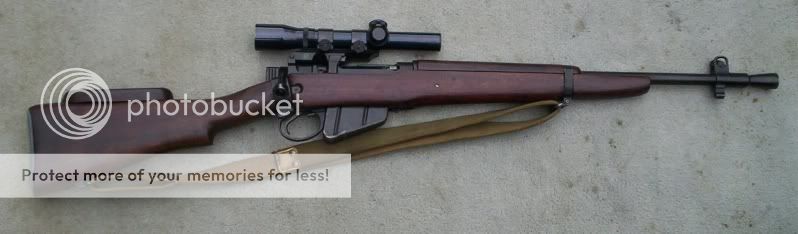
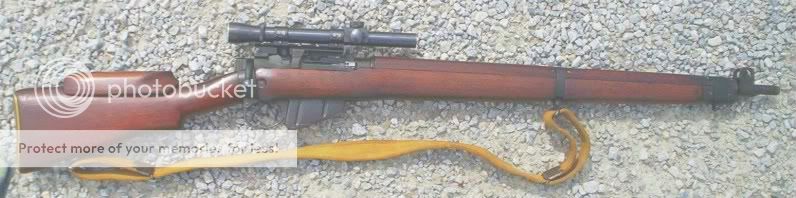
I see some absolutely drop dead photo's of milsurps here and I just cannot come close to the examples shown. I've tried light boxes with a lit background, flood lights and outside in natural light.
WHAT IS THE SECRET ????
I am using a digital camera with a macro setting but only 2.1mega-pixels. Is there that much difference due to the number of mega-pixels ???
Thanks....
 
Ha!

That is like watching a champion shooter and wondering if his results are due to a better gun.

Some guys here are highly skilled photographers.

I am no expert on digital cameras, but it is my understanding that a computer screen does not reveal any more detail byond a certain resolution, so a 5 meg image and a 3 meg image look the same.

I have given up trying to take "pretty" pictures. I just make sure I use the maco feature so the camera will focus and I put a piece of masking tape over the flash, so it does not blow out the picture.

Maybe one of the experts will chime in here and give us some suggestions.....
 
I see some absolutely drop dead photo's of milsurps here and I just cannot come close to the examples shown. I've tried light boxes with a lit background, flood lights and outside in natural light.
WHAT IS THE SECRET ????
I am using a digital camera with a macro setting but only 2.1mega-pixels. Is there that much difference due to the number of mega-pixels ???
Thanks....

Personally I shrink my pics down before posting them or emailing them as otherwise the files are just too damned big. I use Windows Picture Resizer in Windows XP, a free download, to shrink entire groups of photos down in one go. At about 100Kb, very little detail is lost from a 2 mb pic.

When I take the pics, they are like 2 mb in size. I use the macro setting for closeups, holding the camera about 10-12" away from the item and keeping it very still for a few seconds, even after the beep. I take multiple exposures and hope that at least one of them is in clear focus with clear details. Sometimes have to ditch them all and try again. It might take 5 times of the same shot, but one of them will be so clear that you can look into the pores.

But, digital pics are free so it's only time and aggravation!

My camera is only 4MP, but I personally don't think it makes that much difference, as you have to shrink them anyway to post or email.
 
Personally I shrink my pics down before posting them or emailing them as otherwise the files are just too damned big. I use Windows Picture Resizer in Windows XP, a free download, to shrink entire groups of photos down in one go. At about 100Kb, very little detail is lost from a 2 mb pic.

When I take the pics, they are like 2 mb in size. I use the macro setting for closeups, holding the camera about 10-12" away from the item and keeping it very still for a few seconds, even after the beep. I take multiple exposures and hope that at least one of them is in clear focus with clear details. Sometimes have to ditch them all and try again. It might take 5 times of the same shot, but one of them will be so clear that you can look into the pores.

But, digital pics are free so it's only time and aggravation!

My camera is only 4MP, but I personally don't think it makes that much difference, as you have to shrink them anyway to post or email.


Thanks for the "Windows Picture Resizer" tip!! :)

Cheers!
 
Thanks for the "Windows Picture Resizer" tip!! :)

Cheers!

NP

Open a new folder on your desktop,(right click-New-Folder), name it. Download all of the pics from the camera into it.

Just hit Edit-Select All, so they all highlighted, then right click, hit Resize, then hit Large. Once they are resized, and the originals are all still highlighted, hit delete, then enter. Voila, all the huge pics are gone and you have manageable ones left.

Very little loss of quality. Play with it a bit and you'll see what I mean.
 
Last edited:
Background colour makes a difference--white background is worst. If camera has adjustments using flash and a smaller aperture purs more of firearm in focus. Keep the firearm paralel to the camera reduces distortion. make sure the firearm is not too close to the camera--most have a minimum focus distance. Use tripod if you have one, use slightly higher iso speed if required. Practice, practice practice--digital is cheap.
 
I use a 2.0 Kodak.
I've found taking picts outside in the shade is best , then crop the photo . In full sun , there seems to be too much glare but you can beat that by getting it at the right angle.

shade
101_6947.jpg


full sun
lbly3.jpg
 
Good Photos

.
PHOTOGRAPHY IS ALL ABOUT LIGHT

I was taught this right from the start. You have about three minutes to take a picture outdoors, then your light changes, and the results are not the same.

Taking a picture indoors, under light bulbs, will give an un-natural colour to your end result. Incandescent bulbs will give you an orange look, flourescents and other types of lights give different hues of colour. Consider using the self timer function to get clear photos. That way, there is no shake from your body. USE A TRIPOD.

If you use lights indoors, set up two lights. Put the camera at 90 degrees to your subject, then a light on each side at about 45 degrees, an equal distance from the camera and subject to greatly reduce shadows.

Take multiple pictures. Eight or ten are not too much, then keep the best two and use them. If none are really great, then try it again. Trash can any poor photos.

If your camera has manual focus, use it. Get a good basic photography book. Buy it or loan it from the local library. Learn how to use depth-of-field, shutter speed and aperture openings.

Some cameras have a minimum focus range. Many have close up settings. Experiment with these and see what they will do.

.
 
Just wanted to thank one and all for some of the tips on photography. I suspect lighting is my biggest problem, but not wanting to have too much out in the yard in public view, one gets confined to artificial light. Plus, at minus 40 it is a challenge. I see some photo's of proof marks that you can almost see the granular structure of the metal and I am just amazed at the quality that is attainable...
 
As previous have mentioned lighting is critical, buffdog puts the technicalities well, I am not always the best at that, but then use software to fix. A macro lens is only really good for taking things like proof stamps, serial numbers etc. a full lens so you can get the whole firearm in, and then crop out what you want, this is where higher pixels can help, as you are just using a portion of the photo. To post on CGN etc, you do need to reduce size.

As these below.

This one against a white wall, extra lights and some Photoshop, then cropped to size, used a tripod.

LB41.JPG


This is the way I prefer now, lying on the floor on a cream coloured sheet, lighting, I then Photoshop out the cream sheet, and some cleanup. Can be tricky on the floor to get the correct distance, tripods don’t always work at the required distance. Also requires time and patience.

AIA-M10-A1.JPG


These are all taken with simple point a shoot cameras, 5+ meg Pixels.
 
Last edited:
Back
Top Bottom