I was asked in another thread to do a review on the Primos Alpha Dogg caller I purchased this fall. I don’t claim to be an expert, but in my time predator hunting for wolves, I have used (or hunted with others who had) Johnny Stewart cassette, Johnny Stewart electronic and Foxpro Scorpion calls, as well as my own home made call.
I bought the Alpha Dogg for a couple of reasons. One is that Primos makes quality products – I have never had an issue with any of their calls or equipment I have purchased. Second was the price – at $319 from Cabela’s, it was considerably cheaper than any Foxpro model with comparable features. I wanted a caller with a remote handset – no more stiff wires to speakers in the cold. And most important, Primos is a company that promotes fair chase and ethics in hunting and in their videos – I support this and elect to spend my disposable income on a company with these values.
Before I could write this up, Gunner 410 got a Primos Turbo Dogg for Christmas. So we spent New Year’s eve playing with it and downloading calls (much to our wives dismay) and I can do a review of both units.
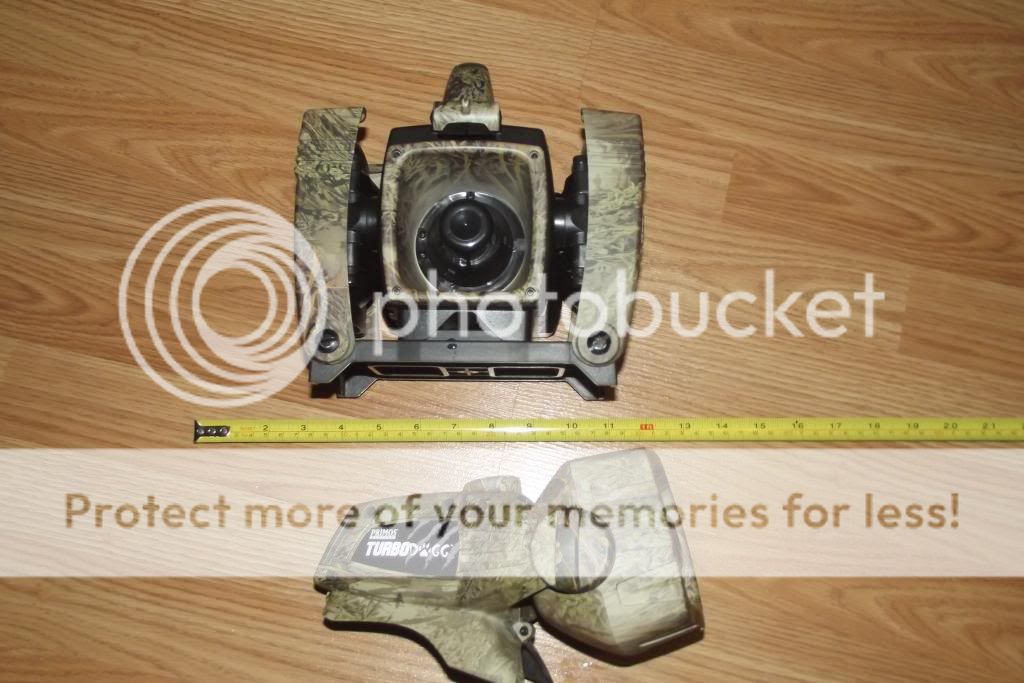
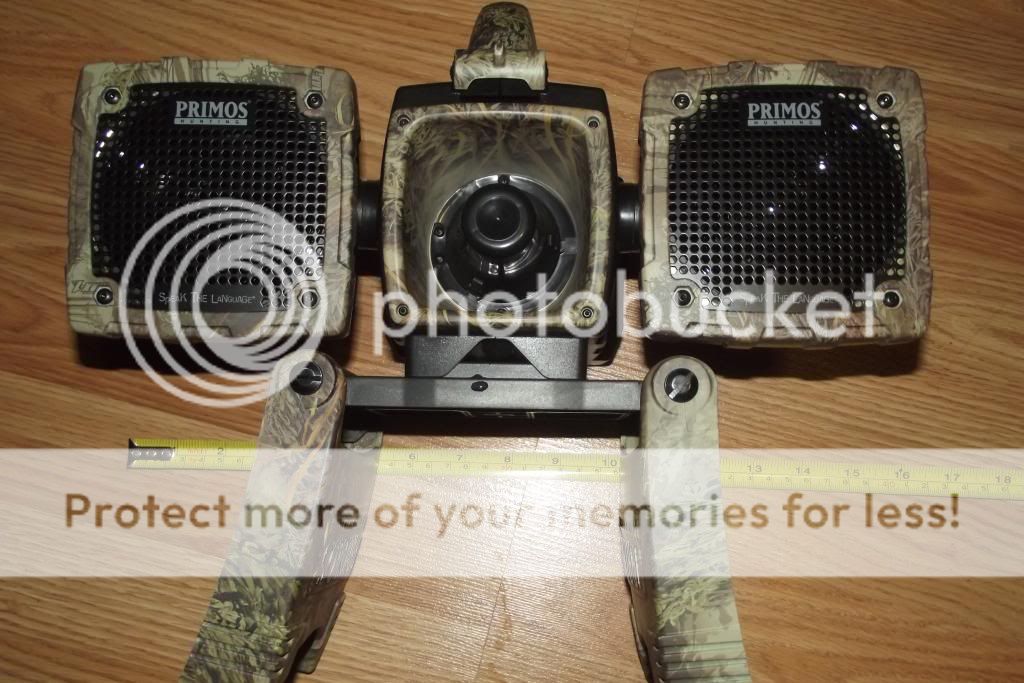
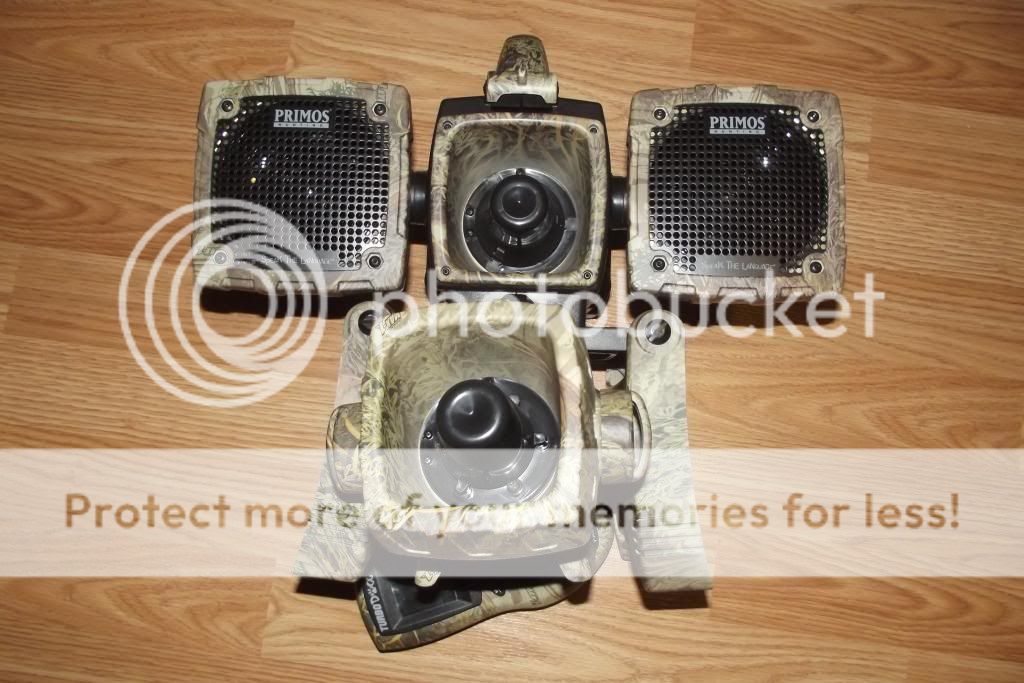
The Alpha Dogg is a bigger unit with one central “horn” and two speakers that turn out and can swivel up and down. It has two “legs” that fold up to protect the speakers when in transit and fold down when deployed in the field. This is very handy in the snow – so far I have been able to set it up and keep the speakers out of the snow. Because it is a larger unit, I had to buy a bigger rucksack to carry it as it didn’t fit in my old hunting daypack.
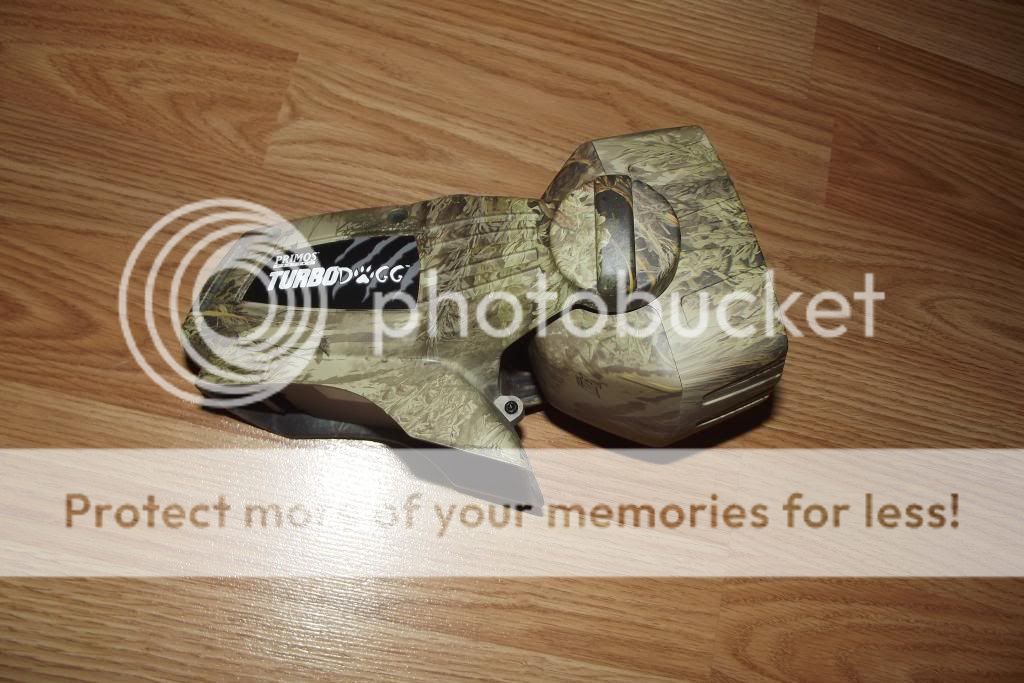
The Turbo Dogg is a compact unit with the same sized horn as the Alpha Dogg. It will swivel a bit, and has no other speakers on it. Gunner 410’s wife found it online for $150 which was the cheapest price I have seen it. It has a couple of small “legs” and this would be ok on the ground, but was an issue in the snow trying to keep it from sinking and filling the horn with snow. One of the nice things about this unit is that it doesn’t take up a lot of room in your pack as compared to the Alpha Dogg.
The handsets for both units are similar, but not the same. Both have the same backlit screen, controls and power button – the Turbo Dogg does not have the two hot call buttons that the Alpha Dogg does. On both units, there is a decoy button that can be set up as a hot button – we set Gunner 410’s decoy button to be a coyote in distress call hot button. The Alpha Dogg comes with 75 different calls on it and 6 preprogrammed expert hunts. The Tubo Dogg has 36 different calls on it and 4 pre programmed expert hunts. We copied a bunch from my unit onto the Turbo Dogg. The backlit screen is easy to read and the backlight can be adjusted to the various light conditions. The text is a little small for those of us with aging eyes, but I can read it without my bifocals on. It would have been nice if Primos included a lanyard with the handsets, and one is needed so you don’t drop it in the snow, and we used a couple of lengths of paracord to make our own.
Make sure you put your most used calls in the “Favorite Calls” file or else you spend all of your time scrolling through the list of calls picking out which one you are going to use next. You can set it up so that the call continuously loops but I found it was better to not set it up this way – I just hit the play button when I want the call to repeat.
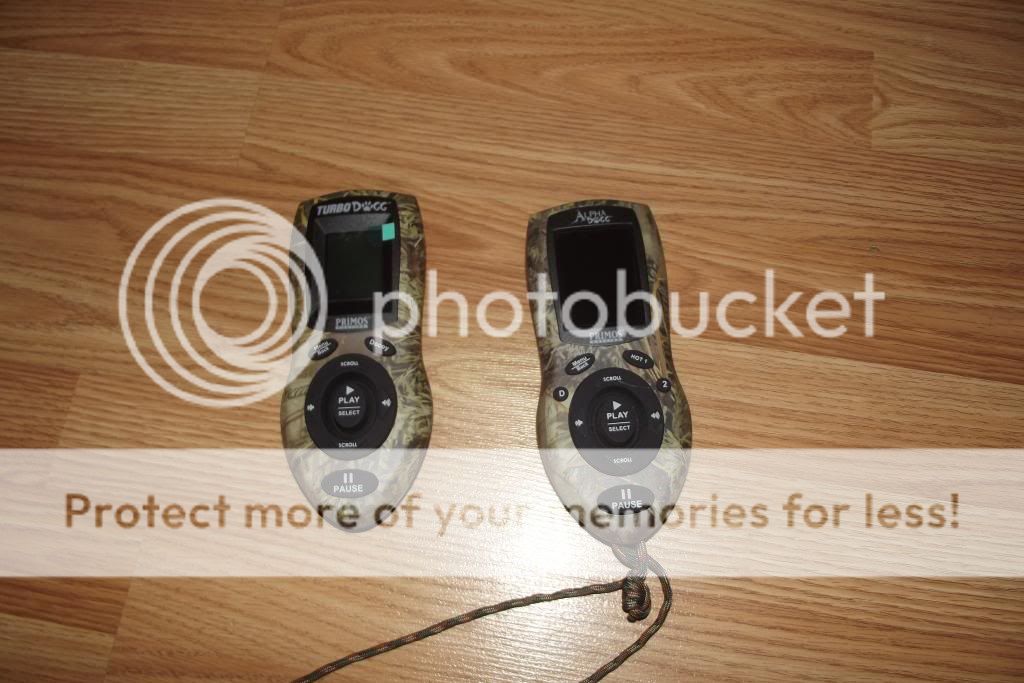
Both units are LOUD! Even with the one horn speaker, the Turbo Dogg belts out the sound. The swiveling speakers on the Alpha Dogg are nice to to move the sound in a wider arc - especially in open areas such as cutovers and hydro lines. Most of the calls I have downloaded and those that are on the handsets when purchased come through with little to no distortion at maximum volume. I am having issues trying to find a wolf call series (vs single howls) that do not distort at over a volume setting of 50 (100 is maximum). I have used mine regularly at 100 yards with no problem connecting with the handset, and I set both units at 150 yards on a powerline last week and again had no problems with either unit connecting. Just remember to turn on the call unit when you set it up, so that you don’t have to walk back and turn it on so the handset will connect!
It is easy to download calls onto the callers. You connect the unit to your computer with a USB cable and then copy the files (all the ones I used were mp3) from your computer to the caller. When you are done, you disconnect from the computer and then turn on the handset in order to synchronize the files. There is an issue with some MP3 files showing up as no name – Primos web site has a fix fo it – you have to go to the MP3 file on your computer, right click on it, pick properties, and then go to details. Click on the title area and type in the title you want to call it. It will then show up on your handset with the name you used when you synchronize your handset.
I have added wolf calls, raven calls, screaming snowshoe hare and coyote calls from various websites. One of the best has been the audio files on a National Geographic web site – check this one out for ravens and then do your own search for different species:
http://animals.nationalgeographic.com/animals/birds/raven/
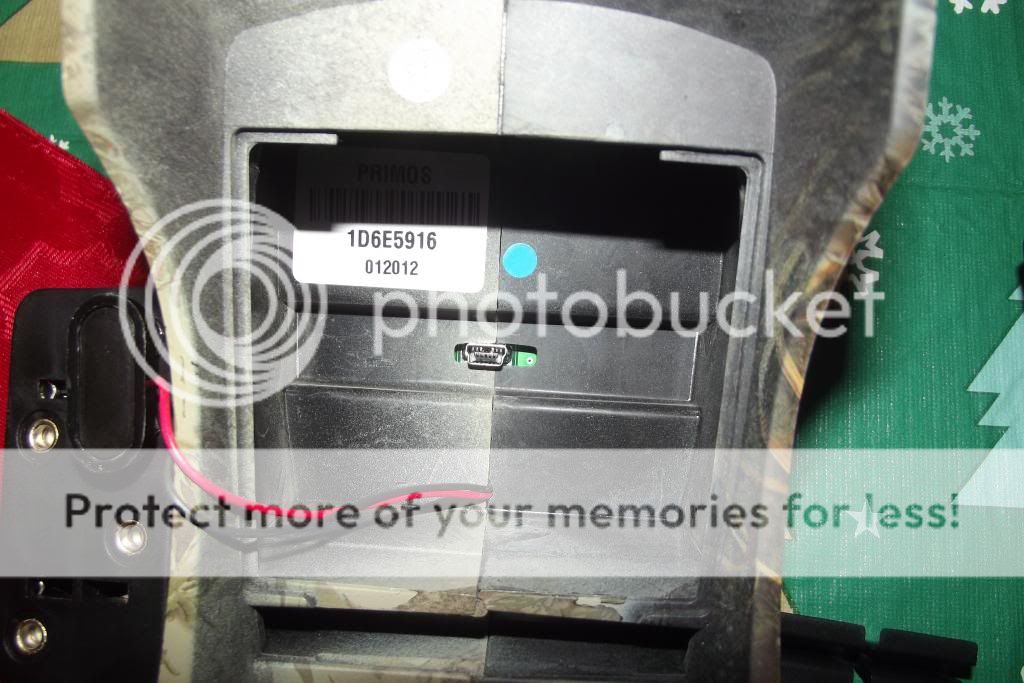
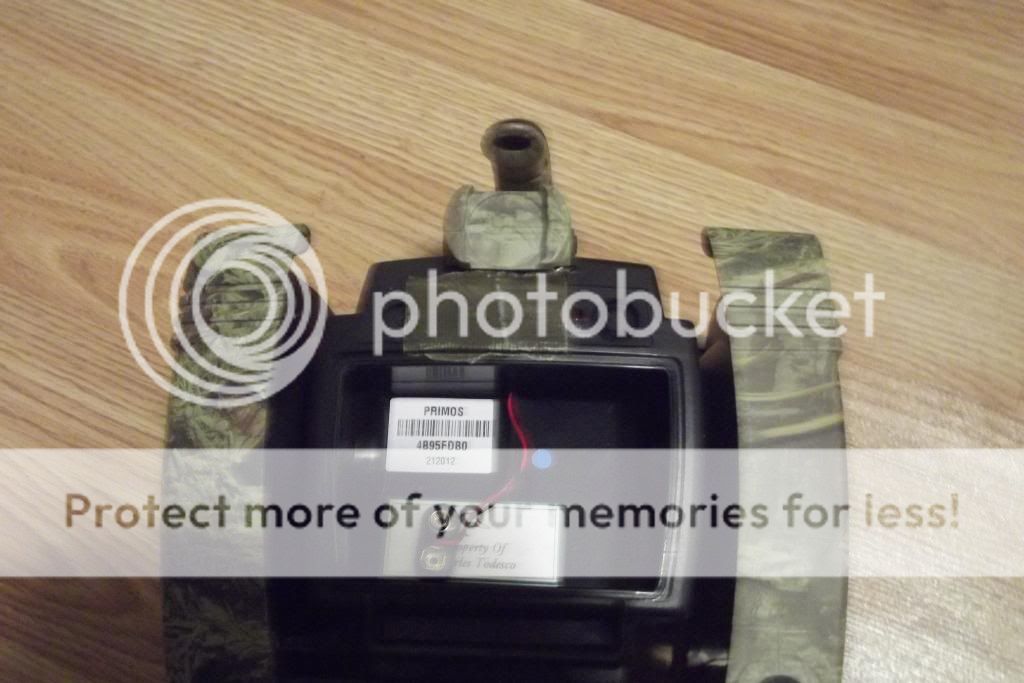
I like the micro USB connector set up on the Turbo Dogg – it is inside the battery compartment and closed off from the elements. On my Alpha Dogg, the micro USB port is on the back and was covered with a rubberized material, which ripped when I first connected the cable. I now have it covered with duct tape to keep the snow out of it – it is a bad design in my opinion.
Turbo Dogg Micro USB Port:
Alpha Dogg Micro USB Port (covered in duct tape ):
):
Both units require 11 AA batteries – 3 in the handset and 8 in the caller. I have been using rechargeable batteries in the caller with no issues. I haven’t used it in extreme cold yet (-18 C was the coldest) to get an idea of battery life, and I recharge the 8 after every days use. I am still using the same 3 non rechargeable batteries in the handset since my first day.
So far I am very happy with my Alpha Dogg and it fills all of my needs. I have called in lynx, fox and a coyote with it in the past 4 weeks that I have used it. After our coyote hunt, Hungry was shopping on line for one as well. Sorry for the long winded write up, if there are any questions, post them and I will try and answer them.
I bought the Alpha Dogg for a couple of reasons. One is that Primos makes quality products – I have never had an issue with any of their calls or equipment I have purchased. Second was the price – at $319 from Cabela’s, it was considerably cheaper than any Foxpro model with comparable features. I wanted a caller with a remote handset – no more stiff wires to speakers in the cold. And most important, Primos is a company that promotes fair chase and ethics in hunting and in their videos – I support this and elect to spend my disposable income on a company with these values.
Before I could write this up, Gunner 410 got a Primos Turbo Dogg for Christmas. So we spent New Year’s eve playing with it and downloading calls (much to our wives dismay) and I can do a review of both units.
The Alpha Dogg is a bigger unit with one central “horn” and two speakers that turn out and can swivel up and down. It has two “legs” that fold up to protect the speakers when in transit and fold down when deployed in the field. This is very handy in the snow – so far I have been able to set it up and keep the speakers out of the snow. Because it is a larger unit, I had to buy a bigger rucksack to carry it as it didn’t fit in my old hunting daypack.
The Turbo Dogg is a compact unit with the same sized horn as the Alpha Dogg. It will swivel a bit, and has no other speakers on it. Gunner 410’s wife found it online for $150 which was the cheapest price I have seen it. It has a couple of small “legs” and this would be ok on the ground, but was an issue in the snow trying to keep it from sinking and filling the horn with snow. One of the nice things about this unit is that it doesn’t take up a lot of room in your pack as compared to the Alpha Dogg.
The handsets for both units are similar, but not the same. Both have the same backlit screen, controls and power button – the Turbo Dogg does not have the two hot call buttons that the Alpha Dogg does. On both units, there is a decoy button that can be set up as a hot button – we set Gunner 410’s decoy button to be a coyote in distress call hot button. The Alpha Dogg comes with 75 different calls on it and 6 preprogrammed expert hunts. The Tubo Dogg has 36 different calls on it and 4 pre programmed expert hunts. We copied a bunch from my unit onto the Turbo Dogg. The backlit screen is easy to read and the backlight can be adjusted to the various light conditions. The text is a little small for those of us with aging eyes, but I can read it without my bifocals on. It would have been nice if Primos included a lanyard with the handsets, and one is needed so you don’t drop it in the snow, and we used a couple of lengths of paracord to make our own.
Make sure you put your most used calls in the “Favorite Calls” file or else you spend all of your time scrolling through the list of calls picking out which one you are going to use next. You can set it up so that the call continuously loops but I found it was better to not set it up this way – I just hit the play button when I want the call to repeat.
Both units are LOUD! Even with the one horn speaker, the Turbo Dogg belts out the sound. The swiveling speakers on the Alpha Dogg are nice to to move the sound in a wider arc - especially in open areas such as cutovers and hydro lines. Most of the calls I have downloaded and those that are on the handsets when purchased come through with little to no distortion at maximum volume. I am having issues trying to find a wolf call series (vs single howls) that do not distort at over a volume setting of 50 (100 is maximum). I have used mine regularly at 100 yards with no problem connecting with the handset, and I set both units at 150 yards on a powerline last week and again had no problems with either unit connecting. Just remember to turn on the call unit when you set it up, so that you don’t have to walk back and turn it on so the handset will connect!
It is easy to download calls onto the callers. You connect the unit to your computer with a USB cable and then copy the files (all the ones I used were mp3) from your computer to the caller. When you are done, you disconnect from the computer and then turn on the handset in order to synchronize the files. There is an issue with some MP3 files showing up as no name – Primos web site has a fix fo it – you have to go to the MP3 file on your computer, right click on it, pick properties, and then go to details. Click on the title area and type in the title you want to call it. It will then show up on your handset with the name you used when you synchronize your handset.
I have added wolf calls, raven calls, screaming snowshoe hare and coyote calls from various websites. One of the best has been the audio files on a National Geographic web site – check this one out for ravens and then do your own search for different species:
http://animals.nationalgeographic.com/animals/birds/raven/
I like the micro USB connector set up on the Turbo Dogg – it is inside the battery compartment and closed off from the elements. On my Alpha Dogg, the micro USB port is on the back and was covered with a rubberized material, which ripped when I first connected the cable. I now have it covered with duct tape to keep the snow out of it – it is a bad design in my opinion.
Turbo Dogg Micro USB Port:
Alpha Dogg Micro USB Port (covered in duct tape
):
Both units require 11 AA batteries – 3 in the handset and 8 in the caller. I have been using rechargeable batteries in the caller with no issues. I haven’t used it in extreme cold yet (-18 C was the coldest) to get an idea of battery life, and I recharge the 8 after every days use. I am still using the same 3 non rechargeable batteries in the handset since my first day.
So far I am very happy with my Alpha Dogg and it fills all of my needs. I have called in lynx, fox and a coyote with it in the past 4 weeks that I have used it. After our coyote hunt, Hungry was shopping on line for one as well. Sorry for the long winded write up, if there are any questions, post them and I will try and answer them.