What rig do you use to photograph your guns?

Claven2

CGN Ultra frequent flyer
Rating - 100%
410   0   2
Location
Onterrible
This is the rig I've recently switched to. Sorry for the crappy point and shoot pic of it, the nice camera is in the photo...

I use two tripod mounted 180 watt-second strobes fired through softboxes. I used to use translucent umbrellas, but the boxes give more consistent lighting IMHO. I use radio triggers to give flexibility when shooting (no wires and no trigger flash). Tripod is a Velbon Sherpa. Camera is an Olympus E-330 DSLR with a Zuiko 14-54mm f2.8 lens and a Zuiko 35mm f3.5 dedicated macro lens for markings.

rig.jpg


And here is a quick and dirty sample of the results... no post processing, though I use either Photoshop CS2 or Elements typically, if needed.

P6020875.jpg
 
Last edited:

thats awesome.. If I had the money id buy some soft boxes and lighting but its expensive! as of now most of my pictures are taking with a cheap 2megapixel camera.. its got macro so its not too bad.

But id love to have a setup like that.
 
I use a plain canon A460 and whatever overhead lighting I have available :p

Maybe I should get you to take the pictures for me! lol ;)

btw is that an original or repro sling? I'm going to start looking for repro slings for the guns I shoot most often.
 
I'm pretty sure the sling is a repro. It's 1917 marked and came with the gun when I got it. Either way, it works good and looks the part :)
 
While I also have some soft boxes I find it is to much trouble to set up. Lack of space is my problem. Considering I only take pictures of my guns to post here due to some thread I try to keep it simple.

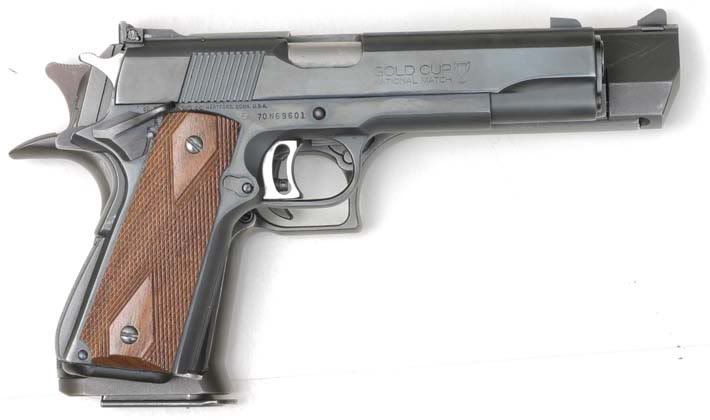
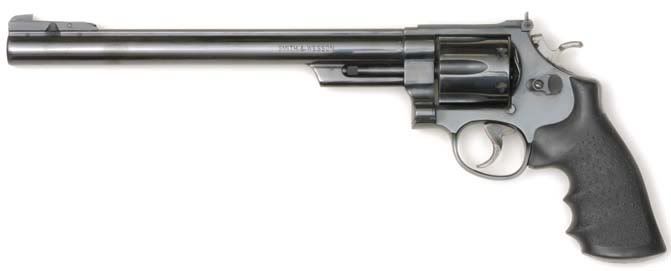
The following were taken with two flash heads pointed up to my living room ceiling. Guns were on the floor. All pictures are taken with an old Canon digital Rebel.
sw29a.jpg


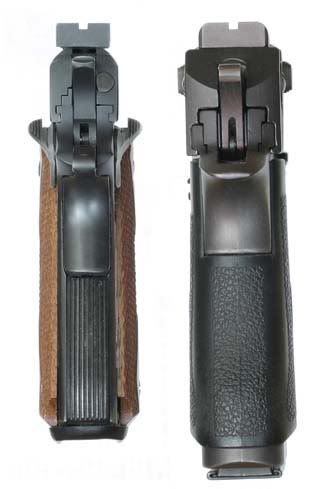
These I took for one of the "what would you carry" threads. It was getting a little out there so I said you could carry a Desert Eagle. :rolleyes: Not all that much bigger than a 1911 (until you consider the width of the gun). I liked how in the second picture the broad light source almost made it look like a drawing.
Stack.jpg

End.jpg


Again two flash heads pointed to the ceiling. I should wipe the finger prints off the guns first. :redface:
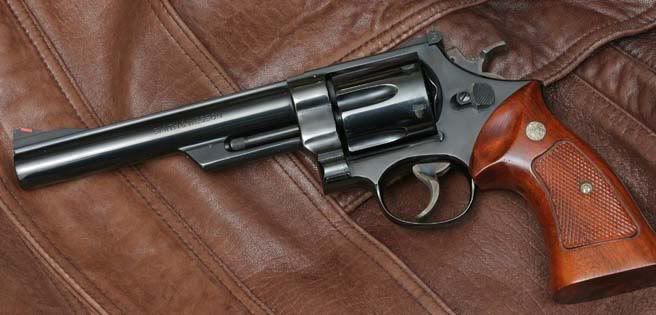
10model29.jpg


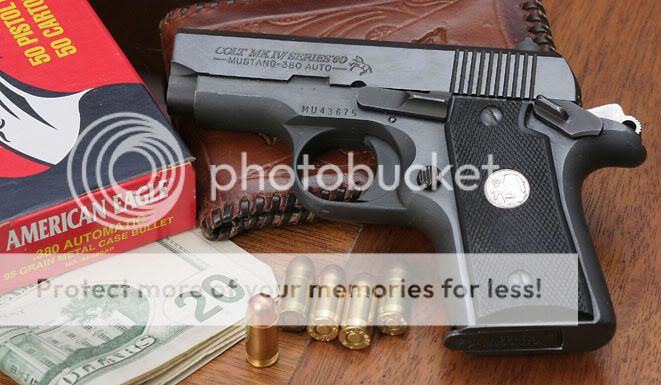
These were on my dining room table. One flash pointed to the ceiling again to get a more broad light.
mustang1.jpg


colt25-1.jpg


Even lower tech.
This one was window light with a white foam core reflector. The gun was on the glass surface of a display case.
DE44.jpg


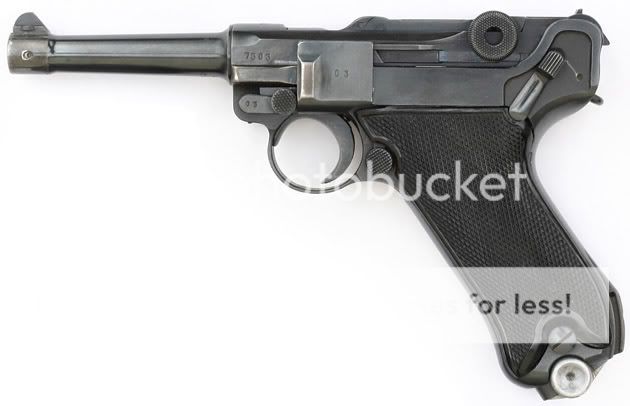
Anyone should be able to do this. (as long as you have a tripod) Outdoor on a white sheet of paper. Overcast sky.
Luger.jpg
 
A little Photo Shop adjustment of your fine picture. I wanted to see a little more detail of the gun. On my monitor your original picture had the gun rather dark.
P6020875.jpg
 
All the ppl I sold rifles to, sent me pictures back saying that my photography skills suck and the rifle looks better than they've been able to see from my pics. ... I thought it's only me, but I see it goes more than just tallent into a good photo. Inspiring to say the least.
 
Hi Rudy,

I didn't photoshop the original image at all. The actual gun IS dark. Your post-processed version makes the wood look "plasticky" compared to the real gun though. Too light. It's a very dark stock in person ;) Also, using the brightness & contrast and colo hue tools you likely employed to lighten the image can (and does) give false rendition of the blues in the flag.

These images should give you some idea how dark the stock really is. Again, no post-processing. Top image take with the soft boxes and bottom image taken with a ceiling bounced strobe gun.

P6020882.jpg

P6020886.jpg
 
Last edited:

Here's a tip too, by the way, to any newbies who want to know how to properly get color rendition.

Open both the original image in my first post and the lightened image Rudy did in photoshop (or elements). Then call up the histogram for each. On the original image you will see a nice bell curve with a graph spike to the very right representing the bright white tones, but the entire spike is still inside the dynamic range of the histogram. The second lightened image, however, has almost all the white tone spike off the scale to the right. This gives a "washed out" effect to the white balance, similar to if the photo had ben over-exposed at least two stops. In layman's terms, it means that the image is just reproducing pure white and all tone depth and image detail data is gone in favor of pure white pixels. If you want the subject to look like it's floating on nothing, this is good. If you want the flag's white stripes to remain part of the photo, it's very bad.

Learning how to use histograms is arguably the most important thing the modern digital photographer will ever do ;)

Photoshop is a very powerful too, to be sure, but one thing I'm coming to realize is that it's easy to overdo it, and the better job you do taking the original picture, the better results you will get, PS or not PS!
 
Last edited:

Like I said in my post "On my monitor" I see almost no detail in in the metal. It could be that on my monitor your gun looks just like it does in real life. On your picture above with the bolt closed I can hardly make out where the metal and where the wood is. While I see the ball of the bolt (because of the highlight) for the most part I can't see the difference in the shaft connected to the ball and the wood behind it. Again, this may be the setting of my monitor.

Considering that most monitors can not show a real life representation (compared to what the human eye can distinguish) I try to show detail even when it may distort or compress the tonal scale. While you may have been interested in the whole picture and the feel it presents I was more interested in seeing your gun. If you were trying to sell it hear (something you were not doing) I would not be able to see what I would want to had I left it with your original settings.

Once again, maybe my monitor has a lot more contrast and I am loosing the detail that you see. I reminds me of programmers I have worked with. When I tell them their program doesn't work they say "it works on my machine". Well not everyone has custom setups. Sometimes you have to deal with out of the box vanilla computers. (they typically have modules loaded on their machines but those modules are not included as part of the software package)

Now looking at your setup in the first picture above I see why your metal is so dark, you have a dark something or other (since its black I can't tell what it is) on the opposite side of the gun from the camera. If you would have had a reflector or a light source or even just the painted wall their you would not have ended up with the metal being so dark. Throwing light from the side works ok for dull mat objects but in order to produce some highlights to distinguish detail you often need something to produce specular highlights (as you have on the back end of the stock and the lower side at the middle of the stock. But then maybe you were not interested in showing detail in the action.
 
Claven2 said:
Open both the original image in my first post and the lightened image Rudy did in photoshop (or elements). Then call up the histogram for each. On the original image you will see a nice bell curve with a graph spike to the very right representing the bright white tones, but the entire spike is still inside the dynamic range of the histogram. The second lightened image, however, has almost all the white tone spike off the scale to the right. This gives a "washed out" effect to the white balance, similar to if the photo had ben over-exposed at least two stops. In layman's terms, it means that the image is just reproducing pure white and all tone depth and image detail data is gone in favor of pure white pixels.

While there is a difference in the histogram (as to be expected) I fail to see where the whites have been washed out (according to the histogram).
Histogram.jpg


Had I only used the brightness and contrast functions (I used neither) then I would have blown the highlights as you have said. I also didn't spend a lot of time doing it since it was not meant to be an improvement but rather to show detail where it was lost. I never tried to improve on your picture as far as tone goes. Something that could have been accomplished with better lighting. :p
 
Interesting. Which version of PS did you open the hist in? I tried it in Elements 2.0 and Photoshop CS2. On both cases, half the hist was off the scale in the second photo? (EDIT: Nevermind. My bad. I had the hist set for color, not luminosity)

Dunno if it makes a difference or not, but I'm working on a Mac (Intel C2D) using a mac LCD wide aspect ratio cinematic display. On the photo of the action showing the bolt handle, I have to put my monitor on the lowest possible brightness setting before I lose detail?

While a rear reflector would have had some effect, I think it would have been marginal given the directed diffuse light from the softboxes. They are on either side and slightly behind the rifle. What would have made a much bigger difference would have been a rear reflector and a third strobe fired into a silvered umbrella and bounced toward the rear reflector... but alas I only have two studio strobes :(

Maybe next time I'll use my third radio trigger to fire a remote speedlight firing into an umbrella...

To those who aren't using advanced lighting setups: Interesting stuff, isn't it? :)
 
Last edited:

Claven2 said:
I'm working on a Mac

JUST WHAT I THOUGHT!

Try viewing your pictures on what most of the world uses and you will be disappointed.

I am using an old version. Photo Shop 6.0 on an PC (IBM) machine.
 
By the way. I altered your photo with the curves function. I believe I anchored the top half of the curve so its tonal scale would not change much, after I bumped up the low end. I then did a quick adjustment to the Blue channel to bring it closer to where it was.

Looking back at the image I do agree (even on a PC screen) it was a bit much. But as I said I was trying to see more of the metal. :)

curves.jpg


Maybe next time I'll use my third radio trigger to fire a remote speedlight firing into an umbrella...

Just use a white reflector. I use foam core for this. On shiny guns (or anything without a mat surface) you should look at the object as if it were a mirror. From the camera's veiwpoint (the only one that counts) the object is a mirror. It could be a flat mirror or a curved mirror or any shape in between. The camera sees what is reflected off the surface from the opposite direction. Throwing light at a mirror that is pointing away from the camera produces no result. The less an object is like a mirror (more flat) the more forgiving of the light direction. I remember one of the jobs I took to photograph a piece of machinery. It was made of stainless steel. I had to have reflectors all over the place in order to show lightness on the metal back to the camera. Just throwing light on it from any direction would not work.
 
Theoretically though, working on a mac shouldn't affect the detail rendition in a photo...

Also, my PC uses an LCD wide aspect too, so I doubt it will matter?
 
Rudy said:
Just use a white reflector. I use foam core for this. On shiny guns (or anything without a mat surface) you should look at the object as if it were a mirror.

I should also point out the gun is dark parkerized - almost black - on the receiver. Even when I light it directly, it really isn't bright exactly. About as matte as you can get, actually.
 
ok, I'm on my PC as I type this. Running a Pentium4HT 2.4GHZ with a GeForce4ti series 128MB card. Monitor is a Proview color calibrated 4ms response wide aspect LCD display. Truth be told, if anything, the images look a tad brighter and detailed (read: saturation and sharpnessappears slightly higher) than on my mac.

Are you using an LCD or an older CRT?

FWIW, the photo of your gold cup on top of the DE looks pretty washed out on this monitor, though the rest of the shots you posted look quite good... Is it possible your monitor is a-typically dark?
 
Last edited:

As I said I did over do it. And I did say "on my monitor".

As far as the gun being parkerized that would be more forgiving with the lighting. More of a mat finnish, but the concept still holds. Consider most things as a mirror, but sometimes a bad mirror. You still get the reflections off the surface from the opposite angle of the camera.

The picture of my Luger (not exactly a mat finish) illustrates this.
Luger.jpg

Look at the barrel just behind the front sight. There is a funny Y shaped black line. This was a reflection of the tripod legs. There was plenty of light falling on the gun from every angle (overcast day) but the camera sees the surface as a mirror and shows what it sees. While the barrel (other than the reflection of the tripod legs) looks whitish in the picture this is just a reflection of the sky. The barrel at that point is as black as any other point on the gun.

Just to note, the Luger looks a lot darker normally. I have it shown brighter to see the detail in the darker areas. Seems to be a habit of mine. ;)
 
Claven2 said:

ok, I'm on my PC as I type this. Running a Pentium4HT 2.4GHZ with a GeForce4ti series 128MB card. Monitor is a Proview color calibrated 4ms response wide aspect LCD display. Truth be told, if anything, the images look a tad brighter and detailed (read: saturation and sharpnessappears slightly higher) than on my mac.

Are you using an LCD or an older CRT?

FWIW, the photo of your gold cup on top of the DE looks pretty washed out on this monitor, though the rest of the shots you posted look quite good... Is it possible your monitor is a-typically dark?

Just goes to show that different computers will show images differently depending on how they are setup. I'm on an old junker PC on a CRT monitor.

Years ago there were bigger differences between Macs and PCs. I remember seeing web pages created on Macs that could not be read (text) because of the tonal differences.

Yeah the Gold Cup picture is washed out. I was interested in showing the size difference. I wasn't to concerned with picture quality on that one. :redface: I only put it up to show the broad lighting with the low tech bounce lighting off the ceiling.
 
Back
Top Bottom